1
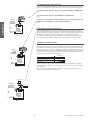
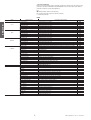
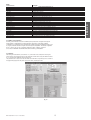
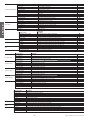
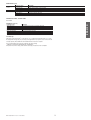
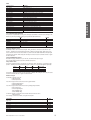
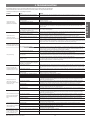
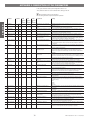
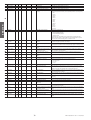
MAINTENANCE group
Parameter name
Manual mng.
driver ‘X’
Driver ‘X’ status
EEV Mode
Requested steps
EEV position
Go ahead
Probes offset S1
Probes offset S2
Probes offset S3
Description
electronic expansion valve control mode, read EEV mode man.
required motor position in manual control.
calculated electronic expansion valve opening position
enable restart following error
correction of the lower limit of S1
correction of the lower limit of S2
correction of the lower limit of S3
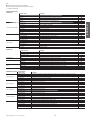
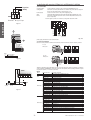
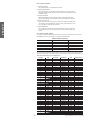
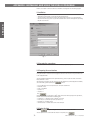
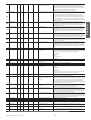
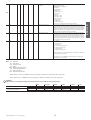
ADVANCED SETTINGS – SPECIAL TOOLS
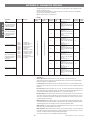
Not available
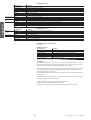
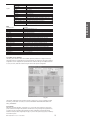
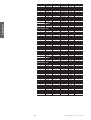
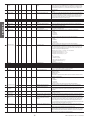
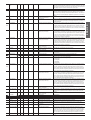
alarm probe error
alarm Eeprom error
alarm MOP timeout
alarm LOP timeout
alarm Low Superheat
EEV not closed
driver X high superheat
Description
active following an error on the signal from the probe
active following an EEPROM memory error
active in conditions with excessive evaporation pressure
active in conditions with insufficient evaporation pressure
active in low superheat conditions
active due to failed valve closing
driver X with high superheat
ENGLISH
ALARMS (for driver ‘X’)
Parameter name
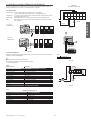
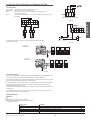
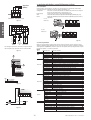
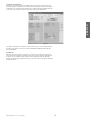
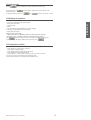
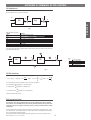
3.4.3 Start-up
After having connected the EVD4, cas described in 3.4.1, configure the parameters listed in 3.4.2 using
the display that manages the pCO, according to the application and/or systems used. For the unit to be
correctly operated, the SYSTEM SET and AUTOSETUP levels need to be compiled.
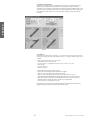
If some essential fields have not been configured, the alarm message
– DRIVER “x” AUTOSETUP PROCEDURE NOT COMPLETED –
will prevent the unit from being started until the autosetup procedure has been completed.
EVD4 +030220227 - rel. 2.1 - 12.06.2008
21