1
Setup
Rating
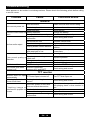
Some DVD discs have built-in parental lock
which prevents children to watch some
scenes as force or eroticism especially.
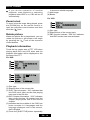
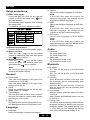
● Set Password
The original password of the unit is null.
You should set a new password ASAP.
Method of changing password:
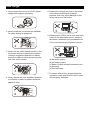
(1)Open the parental lock
Touch the 'Password' option directly to
open the keypad, touch the numeric
buttons to enter your old password (initial
password for the first time) and then
confirm by touching the [ENT] button.
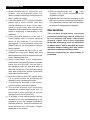
(2) Change the password
Repeat the operation above to enter a
6-digit password (old or new) and then
confirm. The new password becomes
effective and the parental lock is closed.
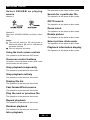
● Parental Ctrl
The unit has some watching level as followings:
(1)Kid safe: A movie rating that is condign
to children.
(2)G: A movie rating that allows admission
to persons of all ages.
(3)P G : A m o v i e r a t i n g t h a t a l l o w s
admission of persons of all ages but
suggests parental guidance in the case
of children.
(4)P G-13: A movie rating that allows
admission of persons of all ages but
suggests parental guidance in the case
of children under the age of 13.
(5)PG-R: PG-related.
(6)R: A movie rating that allows admission only
to persons of a certain age,usually 17,unless
accompanied by a parent or guardian.
(7)N C - 1 7 : A m o v i e r a t i n g t h a t a l l o w s
admission to no one under the age of 17.
(8)Adult: A movie rating that is condign to
the adult only.
Procedures of changing the rating:
(1)Open the parental lock
According to the same method mentioned
in the first step of changing password.
(2)Change the rating
Select an appropriate rating from the
'rating' list.
(3)Close the parental lock
Repeat the operation of the first step to
enter a 6-digit password (old or new) and
then confirm. The parental lock is closed.
● Load Factory
To restore the default settings relating with
DVD playback (e.g.: DVD Audio, DVD
Subtitle), press the [RESET] option only.
Hardware
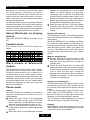
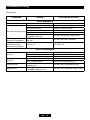
● Camera In
Normal: Actual scenes shot by the camera
display on the TFT monitor while reverse
driving (just like what you are looking).
Mirror: The mirror images of actual scenes
display on the TFT monitor while
reverse driving (just like looking from the
rearview mirror).
● TFT Auto Open
Auto: The TFT panel automatically opens
when the unit is turned on.
Manual: When the ignition is turned off, the
TFT panel remains open if it was opened
previously.
Off: The TFT panel opens only by pressing
OPEN button when the unit is turned on.
● Video input
NTSC: Set the color system of the TFT
screen to NTSC.
PAL: Set the color system of the TFT
screen to PAL.
AUTO: Set the color system of the TFT
screen automatically by the unit according
to the input video formats.
● Parking
On: Image displays only after your car has
been parked.
Off: Image displays at all times.
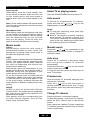
P.VOL
P.VOL means Programmable Volume.
You can balance the volume among different
audio sources using this function.
● Source
Select one playing source that you want to
set relative volume.
● Level
You can set relative volume level from 0 to 3.
● Led Standby
You can set the light of power button on or off.
TS CAL
When the touch function is not sensitive or
valid, you should calibrate the touch screen
by this function.
Calibrate the touch screen just following the screen
introductions after entering the TS CAL mode.
EN - 16