1
DESCRIPTION OF THE PANELS
1
2
GB
1
3
4
1
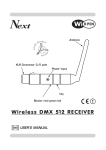
SMA antenna connector
2
Blue led :
Slow blinking: Transmitter OK, no DMX 512 signal.
Switched on : Transmitter OK, DMX 512 signal OK..
3
Red Button for change channel and pairing operation
4
Power input 5 Vdc 600 mA (AC adapter included)
5
Red/Green led :
Blinking Red: Artnet not present
Green led switched on: Artnet packet received
Blinking Green: Wait for next Artnet packet
5
RECEIVER PAIRING
GB
1
Power up Wi D Pen PRO receiver
2
Hold the button until the Wi D Pen Pro led starts blinking r-g-b alternately
3
Remove power supply from WiDMXbyPhone
4
Holding the red button, connect power supply and wait until the WiDMXbyPhone
led starts fast blinking
5
When the led stops fast blinking, the Wi D Pen Pro receiver is paired
RECEIVER
button
Power input
Wi D P E N
XLR Connector 3/5 pole
RGB led