1
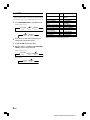
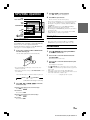
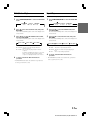
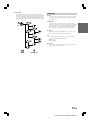
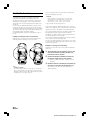
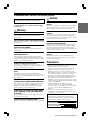
Example of Steps 3 and 4 Setting
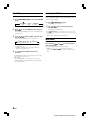
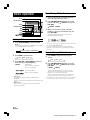
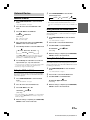
Setting the Bass Focus
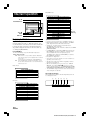
The time difference between the front-rear/left-right speakers, can be
adjusted at the same time. With an initial delay of 0.1 ms for each of
the 0 to 99 steps, audible time correction can be done.
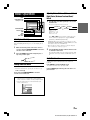
1
2
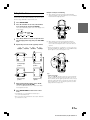
Press AUDIO TUNE.
Press / or - within 15 seconds, select the Bass
Focus setting mode, and press -/J / ENT..
The mode that is blinking at the centre of the display is the
selected mode.
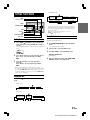
B-FOCUS
(BSF)
EQ
3
4
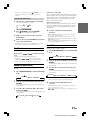
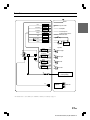
(1) After entering corrections for the front (left and right)
speakers in STEP 15, the time difference is 1.5 ms for both
front-left and front-right speakers.
LPF
T-CORR
(TCR)
∗1
HPF
Press / or - within 15 seconds to adjust the front
(left and right) speaker steps, then press -/J / ENT.
to set.
Repeat Step 3 and set another (speaker) channel.
Front
(Left/Right)
Speakers
1.5ms
1.5ms
Left
(Front/Rear)
Speakers
Right
(Front/Rear)
Speakers
Rear
(Left/Right)
Speakers
FL
FR
FL
FR
RL
RR
RL
RR
(2) After entering corrections for the left (front and rear)
speakers in STEP 15, the time difference becomes 3.0
ms*2 for the front left speaker and 1.5 ms for the left rear
speaker.
*2 Because the time difference was already set to 1.5 ms for the front
left speaker in STEP 1, the additional correction in STEP 15 makes
the time difference of the front left speaker 3.0 ms.
3.0ms
1.5ms
1.5ms
Front (left-right)
speakers
Left (front-rear)
speakers
1.5ms
1.5ms
∗1
FL
FR
FL
FR
RL
RR
RL
RR
Rear (left-right)
speakers
5
Right (front-rear)
speakers
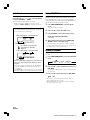
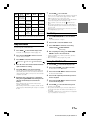
When finished with the settings, press / or -,
select EXIT, and press -/J / ENT..
Tips
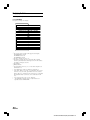
*1 Subwoofer speaker.
Delay (press / or -) the audio signal to the front (left and right)
speakers to make the apparent position of the subwoofer to be at
the front. In doing this, the apparent position between the front (left
and right) speakers and subwoofer will appear equal to the driver.
After performing above, you can change the positions of left and
right speakers by delaying the time.
Selection of CONTINUE will cause a return to the Bass
Focus adjustment mode.
6
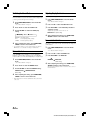
Press AUDIO TUNE and return to the normal
mode.
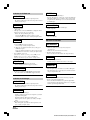
• Any manual time correction adjustments will also affect
corrections made in Bass Focus.
• Time Correction mode is automatically cancelled if no buttons are
pressed within 15 seconds.
21-EN
ALPINE CDA-W925E (EN) 68-05946Z41-A