1
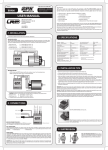
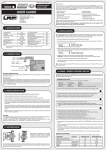
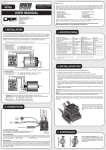
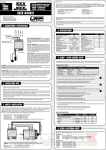
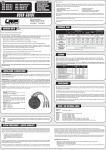
6. radio / speed-control set-up In setup mode the LRP SPX Competition StockSpec stores every step when you press the SET button. All the settings will be stored in the speed-controls memory even if the speed-control will be disconnected from the battery. TRANSMITTER SETTINGS Setup the following basic functions on your transmitter (if available): Throttle travel Brake travel Throttle exponential Neutral trim Servo reverse High ATV, EPA Low ATV, EPA, ATL EXP, EXPO SUB Trim Throttle reverse maximum maximum start with 0 centre any setting, don‘t change after set-up procedure! If your transmitter doesn‘t offer any of above functions, it‘s already in „basic setup“ mode. • Ensure that the speed-control is not connected to the drive battery and is switched off. • Remove motor pinion or ensure that the wheels of the model are free to rotate. • Switch the transmitter on and set the transmitter throttle stick to neutral. 7. mode programming All modes are available for brushless and brushed motors (speedo adapts automatically). The LRP SPX Competition StockSpec features 4 modes which enable you to adjust it to YOUR special requirements. The factory settings are shown in grey colour. • How to get into „programming the modes“ Press MODE button for 3 or more seconds. • How to check the stored values Count the number of flashes of the blue SET-LED (1x = value 1, 2x = value 2, etc.). • How to change the value Press SET button to increase value by one step. • How to get to the next Mode Press MODE button once. • How to leave the programming mode If you are in MODE.4, press the MODE button one more time • Table of settings, values and modes: see below (grey-shaded values show „works default settings“). MODE.1 (AutoCell System): we recommend using value 2 for 4-6 cells NiMH racing purposes, which disengages the LiPo protection. MODE LED Value 1 Value 2 LiPo/NiMH Automatic Yellow • Connect the speed-control to the battery, and switch the unit on. • Hold the SET button pressed for at least 3sec using the supplied plastic screwdriver. You entered setup mode and the SET LED flashes blue (it will flash until the setup is completed). • Leave transmitter in neutral position and press the SET button once. Neutral setting is stored , MODE LED flashes yellow and the motor beeps. smooth Power: 2X smooth Power: 3X Linear Power: 4X Linear+ Power: 6X CHECKING THE FUNCTIONS: Check the LED‘s when moving your throttle stick and you will see if everything is setup correctly. MODE LED off red yellow yellow red red Agressive Power 6X agressive+ Power 7X Agressive++ Power 7X Stock Motor (8.5 - 21.5t) Power Profiles MODE.2 (DEMS Brushed Power Profiles): only with connected Brushed motor Higher value means more overall power and more aggressive throttle response. • This completes the setup procedure and your LRP SPX Competition StockSpec is ready to use. • If you make a mistake during the setup procedure, don‘t worry: Disconnect the battery for about 10sec and start again from the first step. • At the end of each run switch of the car, and then switch off the transmitter. • At the start of each run switch on the transmitter first, then switch on the car. • For storage of the car, disconnect the drive battery at any time! STATUS --partial throttle full throttle partial brake full brake smooth Power: 1X Modified Motor (4.0 to 8.5t) Power Profiles • Hold full brake on transmitter and press the SET button once. Brake setting is stored, LED‘s glow red (MODE) and blue (SET). FUNCTION Neutral (automatic brake inactive) Neutral (automatic brake active) Forward Forward Brake Brake MODE.2 (ADPC™ Brushless Power Profiles): only with connected Brushless motor allows you to adjust the SPX Competition StockSpec to your likes. Either you run on stock or modified motors or on slippery or high-traction surfaces, we have incorporated a profile for you! Higher value means more overall power and more aggressive throttle response. MODE LED Value 1 Value 2 Value 3 Value 4 Value 5 Value 6 Value 7 Value 8 Red • Hold full throttle on transmitter and press the SET button once. Full-throttle setting is stored, MODE LED flashes red. 4-6cell NiMH Racing Mode SET LED blue off off blue off blue MODE LED Value 1 Value 2 Value 3 Value 4 Red smooth, low traction very linear linear, punch increasing aggressive profile Value 5 Value 6 very aggres- super aggressive profile sive profile MODE.3 (Initial Brake): Allows you to set a certain level of „hand-brake-effect“. MODE LED Value 0 Value 1 Value 2 Value 3 Value 4 Value 5 Value 6 Yellow/Red (alternate) No Initial Brake Going from lowest to highest inital brake setting (value 1 = minimum / value 6 = maximum) Team Tips: A good starting point for the brake setting on your radio is 80% (bonded) and 70% (sintered) for all classes. Make sure you do the radio-setup with all settings on the radio on 100%. MODE.4 (Automatic Brake): allows you to set a slight braking action which is applied in the neutral range. This enables you to simulate the feel of a brushed motor and also hold the throttle on longer when entering a turn. For brushless motors you achieve the same natural slowdown as a brushed motor with no autobrake when you set value 1-2 (for motors with bonded magnets) or 0-1 (for motors with sintered magnets). MODE LED Value 0 Value 1 Value 2 Value 3 Value 4 Value 5 Value 6 Yellow/Red (same time) No Automatic Brake Going from lowest to highest automatic brake setting (value 1 = minimum / value 6 = maximum) 8. special Features Internal-Temp-Check System: the LRP SPX Competition StockSpec allows you to read-out the maximum internal temperature that the speedo reached. To store it to the memory, briefly apply brakes after the run before you turn the switch off. You can convienently read-out the temperature back in the pits since it remains stored until you turn it on the next time regularly (which will reset the memory). This new feature allows you to accurately check if all is running well or if you‘re close to shutdown already. How to read-out the temperature: Switch at „OFF“ position. Keep MODE button pressed while you turn switch to „ON“ (then release button) SET LED will start to flash blur (MODE LED is off), now count the number of flashes. Basics: • Thermal shutdown of the speedo would occur at 5 flashes. • The higher the number of flashes, the cooler the speedo ran (e.g. the better it is!) • Every flash equals to ~8°C temperature decrease Example: you count 10 flashes after the run 10 - 5 = 5 (e.g. 5 flashes „away“ from shutdown) 5 x 8°C = 40°C (e.g. you are 40°C away from thermal shutdown and therefore safe!) 9. troubleshooting guide EXPLANATION: If no remark, cause can be either with brushless or brushed motor. If „BM“ is indicated, cause only relating to brushed motor. Symptom Cause Remedy Servo is working, no motor function. Speed-control plugged in incorrectly Plug speed-control in Ch 2 Overload protection activated Allow speed-control to cool down Wiring problem Check wires and plugs Motor defective Replace motor BM - Motor brushes stuck Check that brushes are moving freely Speed-control defective Send in product for repair Speed-control plugged in incorrectly Plug speed-control in with correct polarity Crystal defective Replace components one by one. No servo and no motor function. Launch Control: the launch control allows „rocket like“ starts. After activation it gives you more power one time for the start (this feature is only recommended to be used with touring cars on high traction surfaces!). Activate launch control Hold trigger on radio at full brake for 5sec before start. Ready and active!!! Receiver defective Transmitter defective Speed-control defective Send in product for repair Motor runs in reverse when accelerating forward on the transmitter. BM - Motor connected incorrectly Connect motor correctly Insufficient performance. E.g. poor brake power, topspeed or acceleration.. Motor pinion too big or gear ratio too long. Use smaller motor pinion/shorter gear ratio Transmitter settings changed after set-up Repeat set-up procedure BM - Motor worn out Maintain motor Motor defective Replace motor Speed-control defective. Send in product for repair Motor stronger than motorlimit or input voltage too high Use only motors and batteries which are within the specifications of the speed-control Motor pinion too big or gear ratio too long. Use smaller motor pinion/shorter gear ratio Drive train or bearing problems. Check or replace components. Model used too often without cool-down periods Let speed-control cool down after every run Transmitter settings changed after set-up Repeat set-up procedure Humidity/water in speed-control Immediately unplug and dry speed-control Speed-control defective Send in product for repair BM - Motor suppressors not sufficient Solder capacitors to motor Receiver or antenna too close to power wires, motor, battery or speed-control. Receiver aerial too short or coiled up See „Installation Tips“ and „Installation“ Works-Default-Settings: All LRP speed-controls come factory-adjusted (defaults are grey-shaded above). If you loose track of the modes, you can restore the works default settings. With the transmitter switched on, hold the SET button pressed while you switch on the speed-control. This returns the unit to the LRP works default settings. Receiver defective, too sensitive; Transmitter defective, transmitter output power too low, servo problem Replace components one by one Only use original manufacturers crystals Poor battery connection Check plugs and connecting wires Power Capacitor: Never disconnect the power-capacitor! It offers increased punch and additional protection. Transmitter batteries empty Replace / recharge transmitter batteries Transmitter antenna too short Pull out antenna to full length AutoCell System: Ready for the next battery technology – LiPo batteries! LRP’s exclusive and smart AutoCell System ensures that LiPo batteries can be used safely without accidentially deep-discharging of the cells. The motor function will be shut-off and the SET LED will flash if the system recognises very low battery voltage. ADPC™ Brushless - Power Profiles: results in more power and better driveability. Depending on the status of the car (start, acceleration, full speed) the software calculates the perfect motor management. Higher value means more overall power and aggressive response. Caution: Do not advance mechanical timing on the motor when using high ADPC profiles! D.E.M.S. Brushed - Power Profiles: The known and world‘s winning D.E.M.S. Brushed Quantum style power programs have been implemented into the LRP SPX Competition StockSpec as well. Higher value means more overall power and aggressive response. Automatic Brushless / Brushed Adaption: The LRP exclusive Automatic Brushless/Brushed Adaptation detects the connected motor type during turn-on/initialisation and adjusts the correct brushless or brushed operation automatically. No adjustments required by yourself, apart from the correct connection of each motor type (don‘t forget the hall-sensor-wire for brushless!). Caution: Keep in mind, when swopping between brushless and brushed motors, that the chosen mode values will be identical! Changing Mode settings without the transmitter: At race events you usually do not have access to your transmitter, but never mind since you can simply disconnect the receiver lead from the receiver and change the MODE settings as described in section 7 „Mode Programming“. IceDrive Design: LRP’s secret IceDrive Design results in lower speedo temperature under all racing conditions and for both brushless + brushed. Sorry, no further details to be disclosed. Simply a step ahead of the competition! Forward/Brake: Uncompromising and outstanding performance for top level competition was the target! Therefore the LRP engineering team developed a pure forward/brake competition speed-control without reverse function. Sensored Brushless Technology: Advanced Digital allows the perfect knowledge of the brushless motor’s magnet position. This results in perfect motor control at high and low RPM‘s, as well as perfect brake control. Multi-Protection System, 3-way protection: The perfect protection against short-circuits (motor), overload and overheating. If your speed-control faces overload, the motor function will be shut-off for protection and the SET LED will flash, although the steering function is maintained. Let the speed-control cool down for a few minutes. If you experience frequent shutdowns, check for the following: • Correct gear ratio (refer to motor manual for gearing recommendations) • ADPC setting too high (higher value will heat up motor and speed-control excessively) • Motor is too strong or motor is damaged. Speed-control overheats or switches off frequently. Motor never stops, runs at constant slow speed Radio interference