1
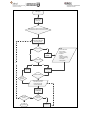
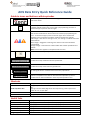
AOS Log In
Click on Data
Entry from the
Data Tab
Select Facility or ward from list (all facilities
associated with the account will be visible)
Search for patient
using Patient Identifier
or discharge date
Patient exists?
NO
Add New
patient
YES
New episode?
YES
NO
YES
Edit Episode
Add Episode
Select Pathway
Click on
Episode
Enter data for patients
episode as per data
collection form for
relevant pathway
Review details
in Audit tab
Create another
record?
NO
Corrections
required?
YES
NO
Log off AOS
Make
corrections
ENTER:
- Patient Identifier
- Date of Birth
- Is Date of Birth
Esitmated
- Gender
- Indigenous Status
- Ethnicity (NZ only)
- First Name
- Family Name