1
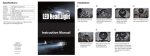
Flush Mount Instructions ‐ Drill a 22mm diameter hole. ‐ Unscrew the locking nut on the back of the device and pull the surface mount bracket off. ‐ Slide the device through the hole and screw the nut on the back side. Adjustment: ‐ The orientation of the unit can be adjusted in either of the mounting positions simply by loosening the nut at the back and rotating the device. Operating Instructions Play music Tap knob once Pause music Tap knob once to pause, tab again to resume playing Skip one track forward Turn the knob clockwise Skip one track back Turn the knob counter‐clockwise Adjust volume up Turn and Hold the knob clockwise Adjust volume down Turn and Hold the knob counter‐clockwise Answer a call Tap the knob to answer a call when phone rings Answer a call when playing music Tap the knob and the music will pause and call will be answered. When the call is ended the music will resume End a call Tap the knob to end an active call Reject a call Press and Hold the knob when the phone rings to reject a call Redial a call Tap the knob twice to redial the last call NOTE ‐ Never attempt to open, repair, or modify any part of the unit. IMPORTANT ‐ Check local laws regarding the use of a mobile phone and a handsfree kit while driving. If you use the Bluetooth® unit while driving, ensure your attention and focus remains on your responsibility of driving safely.