1
Getting Started
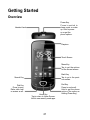
Overview
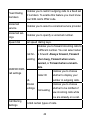
Power Key
Press to switch to
sleep mode or wake
up. Hold to power
on or get the
phone options.
Headset Jack
Earpiece
Touch Screen
Menu Key
Tap to get the options
for the current screen.
Search Key
Back Key
Tap to go to the previous screen.
Dial Key
Press to open
Dialer, dial a call
or answer a call.
End Key
Press to end a call.
Hold to get the phone
options (the same as
holding Power Key).
Home Key
Tap to return to Home Screen.
Hold to see recently used apps.
21