1
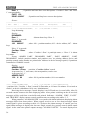
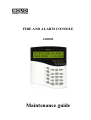
FIRE AND ALARM CONSOLE
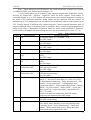
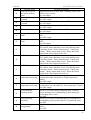
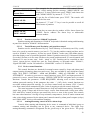
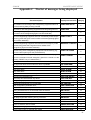
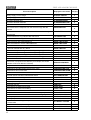
TABLE OF CONTENTS
1 Description of the product and its operability
1.1 Purpose
1.2 Specifications
1.3 Delivery set
1.4 Description the product and capabilities
2 Maintenance
2.1 Preparation the product
2.1.1 General information
2.1.2 Connection console and devices to RS-485 interface instructions
2.1.3 Setting device configuration parameters
2.1.4 Address setting of addressable expanders
2.1.5 Printer connection to console or ‘ARM S2000’
2.1.6 Using the console for “ARM Orion” redundancy
2.1.7 Console configuring
2.1.7.1 General information
2.1.7.2 Adding devices into console database and partition creation
2.1.7.3 Setting partition control rights and password programming
2.1.7.4 Setting control by system relay outputs
2.1.7.5 Setting message transmission
2.1.7.6 Entry zone settings
2.1.7.7 Setting user messages
2.1.7.8 Controlling ‘S2000-BI’ devices settings
2.1.7.9 Using the console for creating of systems controlling gas, powder or aerosol fire
extinguishing installations based on "S2000-ASPT" devices
2.1.7.10 Using the console with sprinkler or drencher extinguishing units based on devices
"POTOK-3N"
2.1.7.11 Using the console with the phone communicator "S2000-IT"
2.1.8 Console mounting
2.1.9 Prevention of the accidents at device installation
2.1.10 Console first starting
2.2 Using console
2.2.1 Displaying, viewing and printing device messages
2.2.2 Partition arming and disarming
2.2.2.1 Console controlling of partitions
2.2.2.2 Partition control at ‘S2000-K’ keyboards
2.2.2.3 Touch Memory and Proximity card partition control
2.2.3 Device control functions
2.2.3.1 Arming/disarming control of device alarm loops
2.2.3.2 Device alarm reseting
2.2.3.3 Manual external device outputs control
2.2.3.4 ‘S2000-ASPT’ device control
2
4
4
5
14
14
15
15
15
16
18
19
19
20
25
25
26
27
29
30
31
31
31
32
33
33
34
34
34
34
35
37
37
39
39
39
39
41
41
42