1
RLL PLUS Programming Basics
10--19
Parallel Branching Concepts
Branching
Methods
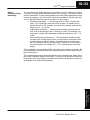
As you examined some of the previous examples you saw we could have more than
one stage being processed on any given scan. The CPU scanned the first active
stage and then moved on to the next active stage, skipping any inactive stages in
between. For some complex applications, you can easily have as many parallel
paths as necessary. This is often called branching or divergence.
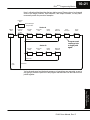
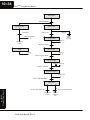
There are a couple of approaches you can take when you want to turn on more than
one stage. The diagrams shown don’t necessarily apply to our press example, but
instead show the various approaches.
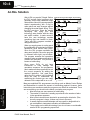
Only executes logic in stages that are active
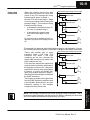
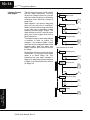
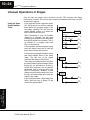
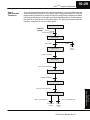
In this example, you use one transition
contact to activate several stages.
ISG
Wait for start
S000
S The SET instruction sets a range of
Start
S20 -- S30
stages. These stages would remain
SET
on until they were reset, or, until
000
S2
any transition instructions contained
JMP
within the stages were executed.
S50
JMP
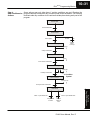
S There are two Jump instructions,
both activating different stages.
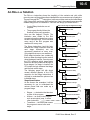
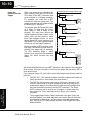
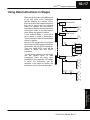
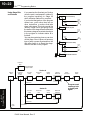
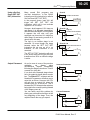
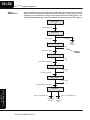
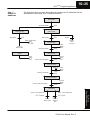
In this example, notice the stage that gets
activated depends on an extra condition.
For example, if the machine was capable
of producing three different patterns,
there may be a section of program for
each pattern.
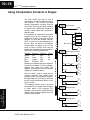
There are other types of contacts that
can be used. For example, you may
recall we used Comparative contacts in
some earlier examples.
Notice we had to repeat the start switch in
a separate rung each time. At first glance
you would think you could simply have
one Start switch contact and OR the
remaining switches. The DL305 CPUs
do support midline outputs (which is what
this is called), but only in an AND
situation.
Only executes logic in stages that are active
ISG
Wait for start
S000
Start
Pattern 1
000
020
Start
Pattern 2
000
021
Start
Pattern 3
000
022
ISG
S0000
S100
JMP
S200
JMP
S300
JMP
Wait for start
Start
Pattern 1
000
020
Pattern 2
S100
JMP
S200
JMP
021
Pattern 3
S300
JMP
022
ISG
S000
S100
SET
000
001
S200
JMP
002
S300
JMP
000
023
DL305 User Manual, Rev. D
RLLPLUS
Programming Basics
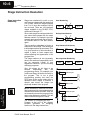
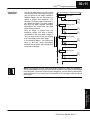
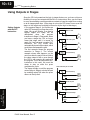
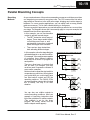
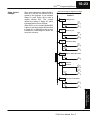
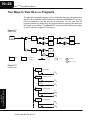
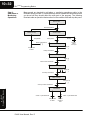
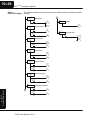
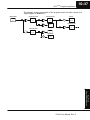
You can also use midline outputs to
control branching conditions. Here’s an
example of branching instructions that
follow the guidelines for midline outputs.
(This example is not for the press
program, but merely shows how the
midline outputs would appear.)