1
User Guide TLS-400
Table of contents
1
General ..................................................................................................................... 3
1.1 Secure the rig ................................................................................................ 3
1.2 Connecting power ......................................................................................... 3
2
Operating the system ............................................................................................. 4
2.1 Daily use on/off ............................................................................................. 4
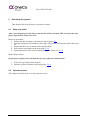
2.2 Operator screen ............................................................................................ 4
2.2.1
2.2.2
2.2.3
2.2.4
2.2.5
2.2.6
2.2.7
2.2.8
2.2.9
2.3
2.4
2.5
Physical Buttons ............................................................................................... 5
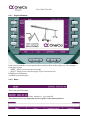
Menu................................................................................................................... 5
Alarm page......................................................................................................... 6
Main page........................................................................................................... 8
Legs.................................................................................................................... 8
Light/Irrigation ................................................................................................. 10
Light schedule ................................................................................................. 11
Irrigation schedule .......................................................................................... 13
Settings ............................................................................................................ 14
Emergency stop .......................................................................................... 16
Buzzer and blitz ........................................................................................... 16
Quick operating procedure ........................................................................ 16
3
Troubleshooting .................................................................................................... 16
4
Contact information .............................................................................................. 18
Side 2 av 18