1
Unit 7 Installing computer hardware
Tools
You need tools to open up the case and remove and replace
components. You might also need specialist tools, such as a cable tester
to test components. (See page 24 for a list of the common tools
needed during hardware installation.) You should always check that
tools are in good condition before using them and store them properly
after use.
Hardware
All the components, such as a video card and driver CD, required for
installation need to be in place before you start, as you will not want to
leave the job halfway through to search for parts that are needed.
Always remember that it is your responsibility to work safely, so never
try to lift equipment that is too heavy. If in doubt, ask someone else
to help.
Access rights
You need access rights to the system that will use the new hardware
component to be installed. This is so that you can install any drivers and
other software that are needed by the component.
For example, you may have to install a new graphics card which includes
a CD containing the drivers needed for this component. You will need
administrator rights to the computer, otherwise the CD will not be able
to install the drivers and the graphics card will not work properly.
Associated installation software
You will need copies of all the installation software that is required
to install the hardware. For example, a scanner will have a CD
with it containing the drivers and software to help scan images
and edit them.
Check equipment
Before installing new hardware, you need to check the equipment
carefully to make sure it is not damaged. Always look at the component
packaging before opening to check for damage, and look for bent pins
or breakages on components. Make sure that any tools you will use are
in good condition.
You should also check any test equipment needed to confirm that the
installation works. For example, you can check a network cable tester
with a network cable that is known to be good before using the cable
tester to check a new network cable.
Other tasks
Backing up data
Users become very unhappy if their valuable data is lost when hardware
is upgraded or repaired, so ICT professionals need to back up data if
there is any risk to it. Some hardware upgrades, such as installing extra
RAM, carry no risk. Any work involving the hard disk needs the user data
backed up first.
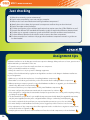
Hardware
components
Access rights
Obtain
resources
Associated
installation
software
Tools
Check
equipment
Back up data
Record serial
numbers
Fit component
Reassemble
computer
Clean
components
Safety checks
Testing
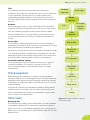
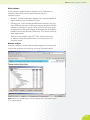
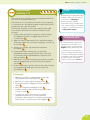
Figure 7.2: Installing a hardware component
involves these steps.
21