1
Contents
Contents
1
2
2.1
3
3.1
3.2
3.3
3.4
4
5
6
7
7.1
7.2
Introduction
Getting Started
Quick Start
Overview
Defining EDID
About HDMI
About HDCP
Recommendations for Best Performance
Your VS-88H 8x8 HDMI Matrix Switcher
Installing the VS-88H on a Rack
Connecting a VS-88H 8x8 HDMI Matrix Switcher
Operating the VS-88H 8x8 HDMI Matrix Switcher
Switching an Input to an Output
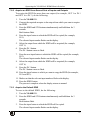
Acquiring the EDID
1
1
2
3
3
4
5
5
5
8
9
10
10
10
7.3
7.4
7.5
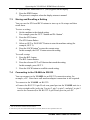
Storing and Recalling a Setting
Connecting to the VS-88H via RS-232
Controlling via ETHERNET
12
12
13
Technical Specifications
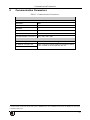
Communication Parameters
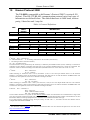
Kramer Protocol 2000
14
15
16
7.2.1
7.2.2
7.2.3
7.5.1
7.5.2
8
9
10
Acquire an EDID from a Connected Output
Acquire an EDID from Several Sets of Inputs and Outputs
Acquire the Default EDID
10
11
11
Connecting the ETHERNET Port directly to a PC (Crossover Cable)
13
Connecting the ETHERNET Port via a Network Hub (Straight-Through Cable) 14
Figures
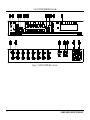
Figure 1: VS-88H 8x8 HDMI Matrix Switcher
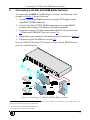
Figure 2: Connecting a VS-88H 8x8 HDMI Matrix Switcher
Figure 3: Local Area Connection Properties Window
Figure 4: Internet Protocol (TCP/IP) Properties Window
6
9
13
14
Tables
Table 1: VS-88H 8x8 HDMI Matrix Switcher Front Panel Features
Table 2: Technical Specifications of the VS-88H
Table 3: Communication Parameters
Table 4: Protocol Definitions
Table 5: Instruction Codes for Protocol 2000
7
14
15
16
17
i