1
3.3
3.3.1
Using Colours
Using predefined colours
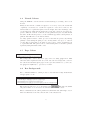
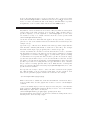
The syntax for colour changes is designed to mimic font changes. The basic
syntax is:
\color{!name"}
This is a declaration, like \bfseries It changes the current colour to !name"
until the end of the current group or environment.
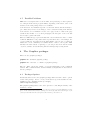
An alternative command syntax is to use a command form that takes the text
to be coloured as an argument. This is similar to the font commands such as
\textbf:
\textcolor{!name"}{!text"}
So the above is essentially equivalent to {\color{!name"}text }.
3.3.2
Using colour specifications directly
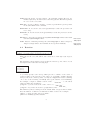
\color[!model "]{!specification"}
\textcolor[!model "]{!specification"}{!text"}
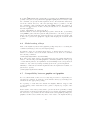
Normally one would predeclare all the colours used in a package, or in the document preamble, but sometimes it is convenient to directly use a colour without
naming it first. To achieve this \color (and all the other colour commands)
take an optional argument specifying the model. If this is used then the mandatory argument takes a !colour specification" instead of a !name". For example:
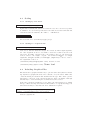
\color[rgb]{1,0.2,0.3}
would directly select that colour.
This is particularly useful for accessing the named model:
\color[named]{BrickRed} selects the dvips colour BrickRed.
Rather than repeatedly use [named] you may use \definecolor to provide
convenient aliases:
\definecolor{myred}{named}{WildStrawberry} . . . \color{myred} . . .
Alternatively if you are happy to use the existing names from the named model,
you may use the usenames package option, which effectively calls \definecolor
on every colour in the named model, thus allowing \color{WildStrawberry}
in addition to \color[named]{WildStrawbery}.
5