1
INSTRUCTIONS
INSTRUCTIONS
3.NOTE
22.WIRING DIAGRAM
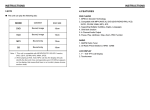
● This unit can play the following disc
This player is equipped with ISO standard connector, please follow below instruction:
●
Red - ACC ON (+12V)
●
Grey/Grey black - Right front speaker (+/-)
●
Yellow – 12 V Constant
●
White/White black - Left front speaker (+-)
●
Black – Ground wire
●
Purple/Purple black - Right rear speaker (+/-)
●
Blue - Power Antenna / Remote Amp Turn On
●
Green/Green black - Left rear speaker (+/-)
●
Orange – Back-Up Camera Trigger (+)
●
Pink – Parking Brake (-)
Note:
The “PARKING BRAKE” wire must be connected to the parking brake system
of your car. When the parking brake is engages, the LCD will be allowed to view
your video. If not, the screen will produce an image saying, “PARKING BRAKE”.
This is a safety feature designed for the driver not to watch a video while driving.
The video output on this unit will not be affected by this.
4
41