1
Parker Hannifin S.p.A. – Divisione S.B.C.
HPD25-67– High Power
User’s Manual
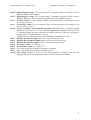
Example 12: 5 positioning with teach-in
(FILE: E003.HPD)
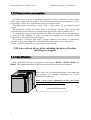
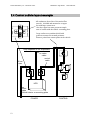
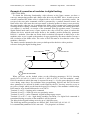
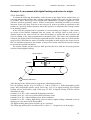
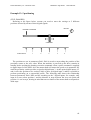
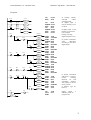
To obtain the following functionality: with reference to the figure, assume you need to
acquire 5 different machine positions and then execute them automatically.
MOTOR
PROX SENSOR
M
CARRIAGE
POSITIONS: 0
1
2
3
4
5
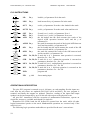
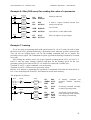
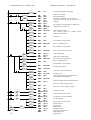
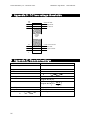
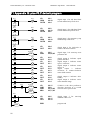
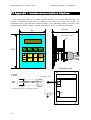
This can be achieved using a smart keypad module (see appendix L, SBC1 program)
connected on the serial communications line with the drive and with the internal PLC. When
the machine is powered up the drive will stand by to receive the homing exec command and
the keypad will show the message “axis zero (F4)”. By pressing [F4] or sending a pulse
command to digital input 2 of the drive, the motor shaft will turn at the speed established by
parameter Pr5 until the intervention of the proximity sensor at digital input 3. The keypad
display will now present the message “automatic dimension 1”; digital inputs 4, 5 and 6 select
the position to be reached, while a pulse supplied to digital input 1 provides a trapezoidal
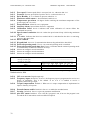
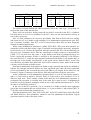
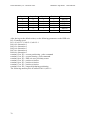
profile to reach the selected position. The following table shows the relationship between
parameters Pr80...Pr89 and the encoding of the 3 digital inputs; for example, input 4 on one
selects position 1 and the distance in steps between the zero axis point and position 1 is set in
Pr81:80, bearing in mind that one revolution of the motor shaft is equivalent to 4096 steps.
Input 6
0
0
0
1
1
Input 5
Input 4
position
dimension
0
1
1
Pr81:80
1
0
2
Pr83:82
1
1
3
Pr85:84
0
0
4
Pr87:86
0
1
5
Pr89:88
other combinations
0
axis zero
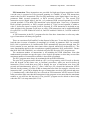
If you want to set the dimension from the keypad, press [F3] and the display will show the
message “dimension xx
yyyy“ where xx defines the dimension in question and yyyy
determines the relative value. The [+] and [-] keys are used to modify the value yyyy while
[F3] changes the value xx.
If you wish to acquire the required position by moving the carriage, press [F1]: the display
will show the message “manual dimension xx “; [F1] selects the xx dimension to be
programmed while [+] and [-] are used to move the carriage. The [+] key provides the motor
start/stop in the positive direction, while [-] provides the start/stop in a negative direction; the
67