1
DF-G1 Expert™ Dual Display Fiber Amplifier
Installation Instructions
Mounting Instructions
Mount on a DIN Rail
1. Hook the DIN rail clip on the bottom of the DF-G1
over the edge of the DIN rail (1).
2. Push the DF-G1 up on the DIN rail (1).
3. Pivot the DF-G1 onto the DIN rail, pressing until it
snaps into place (2).
Mount to the Accessory Bracket
1. Position the DF-G1 in the SA-DIN-BRACKET.
2. Insert the supplied M3 screws.
3. Tighten the screws.
Remove from a DIN rail
1. Push the DF-G1 up on the DIN rail (1).
2. Pivot the DF-G1 away from the DIN rail and remove
it (2).
Installing the Fibers
Follow these steps to install glass or plastic fibers.
1. Open the dust cover.
2. Move the fiber clamp forward to unlock it.
3. Insert the fiber(s) into the fiber port(s) until they
stop.
4. Move the fiber clamp backward to lock the fiber(s).
5. Close the dust cover.
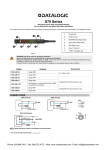
Move forward
to release the
fibers
Fiber Clamp
Fiber Receiver
Port
Fiber Emitter
Port
Phone: 800.894.0412 - Fax: 888.723.4773 - Web: www.clrwtr.com - Email: info@clrwtr.com