1
Proudly Serving the Court Reporting Community for over 23 years
Our Next Update (Continued from page 1)
With the new File Management Program, this
has been reduced to two mouse clicks.
be able to print the condensed transcript and/or the
word index to a PDF file. Now you can e-mail your
clients a condensed transcript without having to buy
e-transcript. In addition, you can specify the
number of columns for the word index (fewer
columns means larger print), print the Q or A in
bold, etc.
Other changes include:
•
Updated User’s Manual, Help files and
Tutorials - in addition, a new Resource program
is available to allow you to view newsletters,
tutorials, hardware issues and other articles we
have written about.
•
Read Program – The Read program has been
updated to work with the new writers available
on the market, such as the elan Mira A3 and the
Fusion from Stenograph and the Stylus from
ProCAT. It allows you to read note files from
drives other than A or B and allows you to use
the audio files produced from the writer in the
AristoCAT Edit program.
•
View Notes Program – you can play the audio
file associated with the note file. For example,
if you read on a note file and an audio file from
one of the new writers, you can listen to audio
file to help you build a job dictionary (and you
can listen to the audio file produced from the
AristoCAT real-time program.)
•
Print Program – you will be able to print to a
PDF file. PDF files are the standard method of
e-mailing files and now you will be able to email a transcript that your client can print. And
you can now specify different fonts (styles, sizes
and even colors) for the headers and footers.
•
Volume 1, Issue 1
•
Real-time Program – You will have the option to
use audio compression for the sound files. Audio
compression reduces the size of the sound file with
little or no loss of sound quality (note that this
statement can depend on the quality of the sound
card in your computer.) The size of a compressed
sound file will be about 1/7th the size of a sound file
that is not compressed. For example, a sound file
that is 140Mb uncompressed will be about 20Mb
compressed. Other changes include showing the
sound level (like, is your microphone plugged in?)
•
Legacy Programming – Some of the programming
that was required for DOS version of the software
has been eliminated. While all of these changes
will be virtually invisible to you, the changes make
the software more efficient and reduce some of the
possible error messages. Examples include the
elimination of the P: drive and some of the extra
dictionary files.
•
Many, many more enhancements.
Before we ship the CD, we will have it available as a
download, so that we can get feedback from our more
adventuresome customers before it is sent out to
everyone.
Condensed Print Program (Multipag) - you will
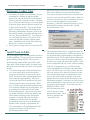
Edit Zoom:
With many of the new laptops and LCD monitors
available in the wide screen format, some customers
have noticed that they can’t make the text in the Edit
program fill the screen as much as they would like
(the maximum zoom percentage is 150%.) Not to
worry. Did you know that you can click in the
percentage box and type in your own zoom value?
Note that the value you type in will not display in
Page 2
the drop down list of zoom values, but the Edit
program will remember what you type in and enlarge
the text each time you go into edit. And you don’t
have to type in a value
that is smaller than 90%
or larger than 150%.
You can type in a
number between one of
the predefined values,
for example 135%.