1
RemoteControl Addendum
Always enlist the services of a licensed electrician
when working with high voltages. Improper wiring
can cause harm to you or your property.
NOTE: For safety reasons it is highly recommended that the unit
only be used to switch low voltage signals (30 volts or less). If you
intend to control higher voltages you must install the unit in an
NEC approved electrical panel or enclosure and have wiring
performed by a qualified electrician.
Switching the Output using the Keypad
To switch the output ON from the keypad:
1. Press STATUS.
STATUS
CONFIGURE
2. Press 6.
6
CALIBRATE
To switch the output OFF from the keypad:
1. Press STATUS.
STATUS
CONFIGURE
2. Press 3.
3
INTERCALL
TIME
Switching the Output over the Telephone
1.
Call the Sensaphone. When the unit answers it will begin
reciting a status report. At any time during the call, press a
touch-tone. The unit will respond with “OK.” The Sensaphone
is now ready to accept touch-tone commands.
2.
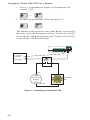
On your phone, press # 6 to turn ON the output. The
Sensaphone will respond “ON.”
+
A-2