1
Table of Contents
AI Quick Start Guide....................................................................................12
The User Interface........................................................................................13
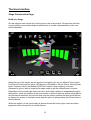
Stage Construction Page..............................................................................................13
Screen Fixture.............................................................................................................14
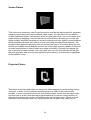
Projector Fixture..........................................................................................................14
Modular LED Fixture....................................................................................................15
Led Lighting Fixtures...................................................................................................15
Human and Structure Fixtures....................................................................................16
Surface Modelling Page................................................................................................17
Canvas editor page........................................................................................................20
Performance Page.........................................................................................................22
Scene Triggers............................................................................................................25
Timeline Page.................................................................................................................26
Output Page....................................................................................................................29
Output Page – Screen Fixture.....................................................................................30
Region mapper tool.................................................................................................30
Masking tool............................................................................................................31
Save & Load regions...............................................................................................31
3d import options.....................................................................................................31
Output Page Projector Fixture.....................................................................................32
Mapping editor.........................................................................................................32
Soft edge blending..................................................................................................33
Output Page Modular LED Fixture..............................................................................34
The Patching Page.........................................................................................................36
The Project Browser......................................................................................................38
System Settings.............................................................................................................39
Controlling AI...............................................................................................42
Timecode Triggering.....................................................................................................43
Procedure for triggering clips with timecode:..............................................................45
Procedure for triggering to multiple fixtures simultaneously with timecode:...............46
Sapphire Media Controller............................................................................................47
Connecting The Sapphire Media Controller to your Ai Server....................................47
Connecting the main touch screen monitors...............................................................47
Connecting the preview screens.................................................................................48
Connecting Sapphire Media Console to Ai Server via USB........................................48
Calibrating the Touch Screens for Sapphire Media Console......................................48
Sapphire Media Functionality......................................................................................49
Optical Encoders.....................................................................................................49
Scene View Buttons................................................................................................49
2