1
12
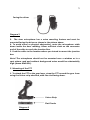
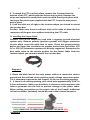
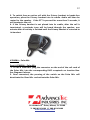
3. To switch from an active call with the Privacy handset to hands‐free operation, place the Privacy handset into its cradle. Audio will then be routed to the speaker. If the PTT is pressed for more than 2 seconds, it will terminate the call. 4. If the Privacy handset is not placed into its cradle, after the call is terminated, a reminder tone will be heard through the speaker, one minute after all activity is finished until the Privacy handset is returned to its handset. AT8428A – Palm Mic Part # AT8428A – Palm Mic 1. To use a Palm Mic. plug the connector on the end of the coil cord of the Palm Mic. into the corresponding RJ45 receptacle on Junction Box. See Diagram 6 above. 2. Once connected, the pressing of the switch on the Palm Mic. will deactivate the Visor Mic. and activate the Palm Mic. rd
1150 NW 163 Drive, Miami, FL 33169 T: 305-623-3939 F: 305-623-3996
www.advancetec.com