1
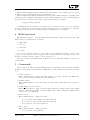
• loadp <preset|file>
This command allows to load the preset number <preset>. User presets start with number 1
and preset 0 corresponds to the built-in preset. This syntax is available since version 3.3.4
of the Amethyst.
For older versions, you have to use the <file> syntax described below, where you provide a
file name instead of a preset number. For compatibility with versions before 3.3.4, newer
versions also support this <file> syntax. The <file> argument is the name of a file depending
on the preset number to load and is formed as follows:
Config n.xml
where n must be replaced with the preset number. For example, in order to load preset
number 1, you should send the following command line:
loadp Config_1.xml
As command lines are case sensitive, you should use an upper case letter in the file name
Config 1.xml. Note: this second syntax does not allow to load the built-in preset.
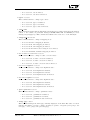
• get current preset
This command sends back the current preset number. This command is available since
version 3.3.4 of the Amethyst.
• get label <n>
This command sends back the name of preset number <n>. This command is available since
version 3.3.4 of the Amethyst.
• get all label
This command sends back the list of all presets available on the machine, along with their
numbers and names. This command is available since version 3.3.4 of the Amethyst.
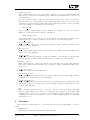
• profile <source>
This command allows to change the current source (also knwon as profile). The argument
is the source number, where the first source is number 0. This command is available since
version 3.4.
• tac preset <source>
This is an old alias for command profile.
• get current profile
This command sends back the current source number (also known as profile). This command
is available from version 3.5.0rc8 of the Amethyst.
• get profile name <n>
This command sends back the name of the source (or profile) number <n>. This is the name
as it appears in the source selection page of the GUI. This command is available from version
3.5.0rc8 of the Amethyst.
• bye
This command requests the server to close the connection. The server then replies BYE
(instead of OK) and closes the connection. Commands exit and quit are synonyms. This
command has no effect on the operation of the Amethyst itself (no shutdown nor sound
vanishing), but only on the client-server connection. This command must not be used with
the rs232 protocol.
6
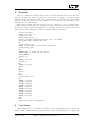
Messages
Here is a list, non-comprehensive too, of the main messages sent by the Amethyst to connected
clients:
• VOLUME <vol >
This message provides the current main volume (in dB).
May 19, 2015
Trinnov Amethyst Automation Protocol
4