1
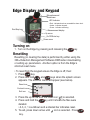
Edge Display and Keypad
Microphone and
windscreen
LED Indicator
• Red - indicates dose has exceeded the alarm level.
Run/Stop key
• Amber - indicates stopped.
• Green - indicates measuring.
Measurement display
Up arrow
On/Off/Enter key
Down arrow
Turning on
1. Turn on the Edge by pressing and releasing the
key.
Resetting
Resetting (or clearing the data) is performed by either using the
3MTM Detection Management Software DMS when downloading
or setting up parameters. Another option is from the Edge’s
shortcut reset menu.
• To reset from the keypad ensure the Edge is off, then:
1. Press
key.
2. Press and hold
and
keys when the splash screen
appears. The shortcut menu will appear (see below).
Reset icon
Contrast icon
Exit icon
3. Press the up arrow until the reset icon
is selected.
4. Press and hold the
key until it shows the files were
deleted.
• A 3, 2, 1 countdown and a shaded bar indicates reset.
5. To exit, press down arrow until icon is selected. Press
key.