1
Pic. 3-7-1
Pic. 3-7-2
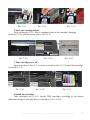
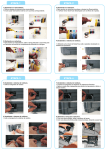
8 Attach fixation
Tidy ink tube up. Tear seal off, attach fixation like (3-8-3). Press ink tube while
closing printer cover to avoid it deforming.
Pic. 3-8-3
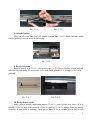
9. Ready for print
Plug on power wire (3-9-1), turn printer on (3-9-2).Check whether printer and ink
tube can run normally. Close printer cover and check whether it is strange noise while
printing.
Pic. 3-9-1
Pic. 3-9-2
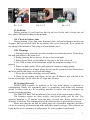
10. Test printer nozzle
Enter printer nozzle inspection option (3-10-1), print nozzle test sheet. If it is
normal (3-10-2)), then start printing. If line is missing (3-10-3), please clean the nozzle
cleaning. If one color is missing , then maybe there is air in nozzle. If it is still a little
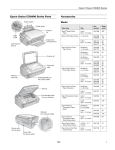
INSTALLATION MANUAL ON CISS FOR PRINTER EPSON CX8400
5