1
IMPROVEMENTS
MXFix
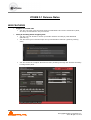
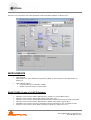
Expert Settings panel now available for Jünger
Continuous watch
MXFix will be relaunch automatically if a problem is encountered
If the MXFix Watch mode encounters a failure due to a specific file, this file will be put in
folder named “Errors”. MXFix will then restart automatically and process the next file in
order
Auto-detect low memory conditions and relaunch if necessary to free memory
MXFix now integrates a checkbox "DEC Dolby E" for batch decoding of Dolby E streams, in the
"Channel Description" panel
FinalCheck comprehensive XML report with no limitation on number of channels
Daily report logging MXFix activity throughout each day (text file exportable to Excel table)
Wrap
Dolby decoding “DEC Dolby E” option now available in the Audio Processing
Users can chose the channels destination
Wave file format now supported in Wrap
Final Check
No longer limited to 8 channels
Can measure up to 24 channels
QuickTime
Added wrap support for HDV, IMX, and XDCAM codecs
Render
MXF: support of B-frames in Render of MPEG2-HD (XDCAM-HD)
Waveform generation
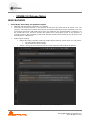
Added the possibility to force the waveform generation even if this disabled in the Settings.
Force the Waveform generation by selecting the timeline clip and accessing the context menu
(Mouse + Right Click) and select the entry “Build Waveforms for Selected Clip”
Added warnings:
Added message box when memory is > 85% just after loading a file. To warn of potential
memory shortage
Added warning message if Dolby encoding is set and audio out is not 24-bit (MT4397)
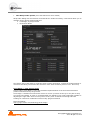
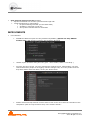
Added “align audio read on frames” option (button)
Under the Buffer and Frames setting in order to “align audio read on frames”
This option must be enabled for MXF files
Will improve Audio reading performance for video file with embedded audio
Replaces the registry key “VS3 Virtual Tape”
Auto fit Composition window
Media imported in an empty timeline will automatically fit the composition window range
Media imported out of the timeline displayed range will Auto fit the composition window
range to show all the media clips present in timeline
© Copyright Merging Technologies Inc.
2010. All rights reserved