1
Chapter 1 Getting Started ........................................................................................................................... 4
1.1
Important Safeguards ........................................................................................................................................... 4
1.2
Regulatory Notice .................................................................................................................................................. 5
Legal Information
Safety Instructions
Regulatory Notices Federal Communications Commission (FCC)
1.3
Package Contents .................................................................................................................................................. 6
1.4
Before Installation ................................................................................................................................................. 7
1.5
Unpacking ............................................................................................................................................................... 7
1.6
Optional Accessories ............................................................................................................................................ 7
1.7
Default Password & Reset Diagram ................................................................................................................... 8
1.8
Structure Diagram ................................................................................................................................................. 9
1.9
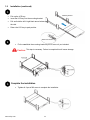
Installation ..............................................................................................................................................................10
1.9
Installation (continued) ........................................................................................................................................11
1.10
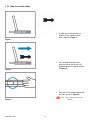
How to use the slides ...........................................................................................................................................12
1.11
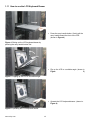
How to use the LCD Keyboard Drawer .............................................................................................................13
1.14
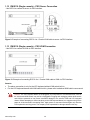
RW119 (Single console) – PS/2 Server Connection .......................................................................................14
1.15
RW119 (Single console) – PS/2 KVM Connection ..........................................................................................14
1.16
RW119 (Single console) – USB Server Connection .......................................................................................15
1.17
RW119 (Single console) – USB KVM Connection...........................................................................................15
Chapter 2 Operation .................................................................................................................................. 16
2.1
On-screen Display Operation .............................................................................................................................16
2.2
On-screen Menu ....................................................................................................................................................17
Chapter 3 Standard Specifications .......................................................................................................... 18
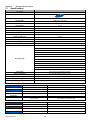
3.1
Specifications ........................................................................................................................................................18
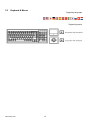
3.2
Keyboard & Mouse ...............................................................................................................................................19
Chapter 4 Optional Specifications ........................................................................................................... 20
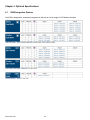
4.1
KVM Options ..........................................................................................................................................................20
4.2
DVI-D Option ..........................................................................................................................................................20
4.3
BNC + S-Video Option..........................................................................................................................................21
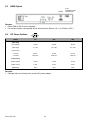
4.4
Audio Option..........................................................................................................................................................21
4.5
HDMI Options ........................................................................................................................................................22
4.5
DC Power Options ................................................................................................................................................22
Chapter 5 Troubleshooting ....................................................................................................................... 23
www.raloy.com
2