1
Using the menu
01
02
03
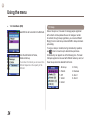
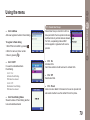
1.7 Delete
Transfer all the contacts in SIM to Phone.
Deletes contacts in the phone memory or the SIM card.
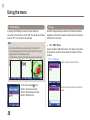
1.7.1 One by one
Deletes contacts one by one.
●●
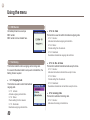
1.7.2 All
Deletes all contacts in either the phone memory or the SIM card,
or in both the phone memory and the SIM card.
●●
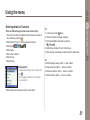
Press Copy in the screen.
1.6.2 Phone to SIM
Copies contacts in phone to SIM card.
The names and main numbers in the phone contacts are copied
to SIM card and the rest of the numbers are ignored.
The procedures to use Phone to SIM are same as SIM to Phone.
●●
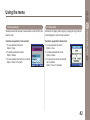
1.7.2.1 Phone :
Deletes all contacts in phone memory.
1.7.2.2 SIM :
Deletes all contacts in SIM card.
1.7.2.3 Phone & SIM
Deletes all contacts in both phone memory and SIM card.
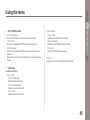
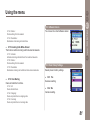
1.8 Memory Status
Shows total space used and number of
contacts in memory of phone and SIM card.
Up to 255 contacts can be stored in the
phone. The number of contacts that can
be stored in the SIM card varies depending
on the type of SIM card and the service
provider.
37
Using the menu
1.6.1.2 All :
04