1
User Code Change
The user is required to enter his/
her current personal code before
changing it.
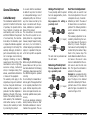
User code change key sequence:
CODE
PRG
NEW
CODE
(4 digits)
beeps)
Bypassing key sequence (zone
2 used in the example):
2
0
2
2
(2
Battery low
or missing
Communication
error
Fuse
blown
NEW
CODE
(reenter)
Bypassing
To execute a bypass operation the
user is required to enter a valid
code:
ENT
BPS
.
Pressing a numeric key bypasses
the respective zone. The LED, corresponding to the zone number,
lights up. Pressing the same key
once again de-bypasses the zone
and the LED goes out.
The selected programming is confirmed by pressing
ENT
.
Technical Troubles Review
To review troubles the user is required to enter a valid personal
code:
CODE
To review event memory the user
is required to enter a valid personal
code.
CODE
MEM
NOTE: Certain users may not be
allowed to review event memory.
TRBL
In the events of AC loss and low
battery, the “AC power is lost” or
“Battery discharged” messages will
sound correspondingly 3 times every 5 seconds.
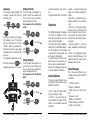
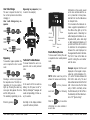
Each digit on the display indicates
a specific technical problem.
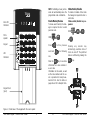
Voice Guide Keypad - LED63VG User Manual
Phone line
error
Events Memory Review
ENT
CODE
Tamper
AC lost
12
Press
to for a previous
event and
for a following
one.
Press the
ENT
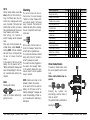
Information on the events, as well
as the zone numbers and the users is presented in binary-hexadecimal form. Use the table above
to interpret them.
For convenience the table also includes a graphic representation of
the LEDs as they light up for the
respective event. A black digit on
white background indicates an extinguished LED, and a white digit
on dark background indicates a lit
up LED. Scroll from LED 1 to LED 6
to determine the correspondence
between the event displayed on
the keypad and the text in the table.
The first 17 rows in the table are
used for coding the user number
and the zones.
Example: Suppose that the event
displayed on the keypad is represented by a LED combination of 2,
3, 5 and 6. The table discloses the
first LED 2 data entry. The next
data entries disclose that of the first
LED 3. Next comes the first data
entry of LED 5 and finally comes
the first data entry of LED 6.This is
the data entry with the ordinal number of 27 “Quick arming”.
key to see more
information on a zone number or
a user code.
13
Voice Guide Keypad - LED63VG User Manual