1
7
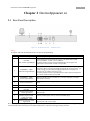
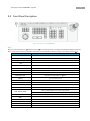
User Manual of the PTZCONTROL2 keyboard
Button
Description
DVR control mode: change the tab menu
The next item, can be a channel or menu setting
NEXT
The previous item, can be a channel or menu setting
LAST
d.
d.
MON
When controlling the VMS or analog matrix, press this button to choose the monitor
CAM
MODE
Numeric & characters buttons
(0-9)
CLEAR
ENTER
IRIS+ /EDIT
When controlling the VMS or analog matrix, press this button to choose the camera.
Press to switch the control mode of the keyboard
Input the number orcharacter; choose the live view or playback channel.
Clear the numbers input and exit.
Enter
PTZ control mode: iris+
DVR control mode: enable editing
IRIS -/PTZ
PTZ control mode: irisDVR control mode: show the PTZ control menu
FOCUS+ /A
PTZ control mode: focus+
DVR control mode: switch the input methods
FOCUS -/PREV
PTZ control mode: focus-
ZOOM+
ZOOM -/ MAIN/SPOT
DVR control mode: switch the screen display.
PTZ control mode: zoom+
PTZ control mode: zoomDVR control mode: switch between main and auxiliary mode
LIGHT /F1
PTZ control mode: turn on the light
WIPER /MENU
PTZ control mode: enable wiper
DVR control mode: open the main men
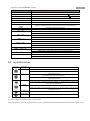
2.3 Joystick Function
G raphic
Operation
F unction
Up
PTZ control mode: Move the PTZ up.
DVR control mode: Fast Play when playback, or navigate to the previous item when
operating the menu.
Down
Left
PTZ control mode: Move the PTZ down.
DVR control mode: Slow play when playback, or navigate to the next item when
operating the menu.
PTZ control mode: Move the PTZ to the left.
DVR control mode: Skip backward when playback, or navigate to the previous menu
when operating the menu.
Right
Left Rotate
PTZ control mode: Move the PTZ right.
DVR control mode: Skip forward when playback, or navigate to the next menu when
operating the menu.
Right Rotate
Zoom in
Zoom out
Notes:
The joystick realizes pan and tilt movement at 8 directions.
The 4-axis joystick can be used to control the zoom; and the central button used as Enter button and to realize picture capture as well.