1
DoorKing Part Number
Installation
1801-080
Cellular System Information
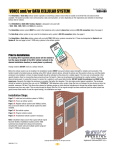
Powering Up Cellular System - The Voice ONLY cellular system will NOT function until
online registration has been successfully completed on DoorKing’s Cellular website.
Within 1 minute of powering up the cellular module, the module lights should turn on. If
they don’t, check that the cellular power switch is turned ON. Signal strength Bars should
be lit GREEN indicating good cell reception. YELLOW bars indicates poor reception but
may still work. RED bars indicates no reception. The cellular module’s lithium battery
needs time to charge. Allow at least ½ hour of charging time before using system.
Program the assigned phone number (from DKS cellular registration) into the 1800 entry
system to make a test call.
g
tin
un t
o
e
M ck
Bra d
an re
a
rdw
a
H
Adjusting 1800 Entry System - When making a test call from the 1800 telephone entry
system, adjust the microphone, speaker and feedback on the entry system, See specific
1800 Installation/Owner’s instruction manual for more information.
re
Wi
re
Wi
n
Ru
n
Ru
The plastic enclosure comes with mounting brackets and hardware to
mount on enclosure. Mount enclosure on surface using appropriate
hardware (not included). IT IS NOT RECOMMENDED DRILLING
HOLES IN THE PLASTIC ENCLOSURE! If holes must be drilled,
remove the circuit board before drilling and be sure that mounting
bolts/screws do not touch the back of the circuit board. Holes must
be sealed to prevent water intrusion.
Using Two 1800 Entry Systems - Each 1800 must be programmed for MULTIPLE
SYSTEMS. see specific 1800 Installation/Owner’s instruction manual for information to
program each 1800.
TWO 1800 Entry Systems Master Codes - Each 1800 entry system’s Master Code must
be DIFFERENT. The DKS cellular server identifies each 1800 by its unique master code.
This allows separate programming for each 1800.
Battery Back-Up - The cellular module contains a lithium battery which will ONLY power
the cellular “Voice” system during a power outage for approximately two hour depending
on usage. The 1800 and the cellular system’s “1801-010 Circuit Board” MUST also have a
back-up battery installed to operate during a power outage. DoorKing recommends using
a DKS Model 1000 power inverter for full system backup.
Battery Replacement for the Cellular Module - The lithium battery is located inside the
cellular module. The circuit board must be removed and the cellular module from the
board to gain access to the battery door on back of the module.
Online Registration MUST be Completed
DKS Cellular requires a SEPARATE registration from the DKS IM Server. If a customer already has an IM Server account and wants to add a DKS Cellular system, this
will require a SEPARATE User ID and Registration.
• DKS IM Server includes: IM Server Modem and IM Server Client.
• DKS Cellular includes: Cellular Phone and Data Transfer.
Before registering a cellular system on DoorKing’s Cellular Server you will need:
• SIM ID number located on the cellular module (number is unique for each cellular module).
• Master Code of System A.
• Master Code of System B if connected, MUST be a different master code than System A.
OPTION 1. Go to DKS cellular website: https://dksdb.dksoftware.com/NewUserRegChoice.aspx to register, follow instructions on website.
OPTION 2. Online registration is directly offered when installing the DoorKing Remote Management Software version 6.3.g or later on YOUR internet connected PC.
Create an account and select the Voice ONLY account from the options.
• Voice Only (Only service available for Voice ONLY cellular system)
• Voice and Data (not applicable)
• Data Only (not applicable)
Enter the SIM ID number to identify the Cellular System to the account created. After the SIM ID number is entered along with the local billing address,
a local cellular phone number will be assigned to that cellular device.
Register the 1800 systems (Master Codes) to the account. The FIRST 1800 master code entered will be identified as System A. If a second 1800 master code
is entered, it will be identified as System B.
Testing
SYSTEM A
Final Testing after the Cellular System has been Registered - All systems should be tested and final adjustments done.
Connect a telephone butt set to the cellular system circuit board Phone Line and make sure the line is active and that phone
calls may be made and received.
If the phone line is not active, something went wrong during the registration which must be corrected. If still having
problems, call DoorKing tech support. Attach a label to the inside of the cellular enclosure listing the local phone number that
was assigned during registration.
PH LINE
PH LINE
RS 232
DATA OUT
DATA IN
BUSY OUT
BUSY IN
GROUND
Voice Testing - Program a phone number into the memory of the 1800 using the 1800 keypad. Then call that programmed number on the 1800. Have the call
recipient press “9” on their phone to open the door. Verify the 9 tone is detected (door will open). Adjust the feedback on 1800 as necessary. See specific 1800
Installation/Owner’s instruction manual for programming and adjustment information.
Note: Factory set Tone Open numbers: 9 tone activates Relay 1. 0 tone activates Relay 0. 5 tone activates Relay 2. For cellular, the preferred tone for Relay 2 is the 8 tone.
1801-065-A-7-15
3