1
Safety
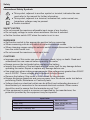
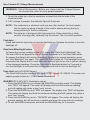
International Safety Symbols
● This symbol, adjacent to another symbol or terminal, indicates the user
must refer to the manual for further information.
● This symbol, adjacent to a terminal, indicates that, under normal use,
hazardous voltages may be present
● Double insulation
SAFETY NOTES
● Do not exceed the maximum allowable input range of any function
● Do not apply voltage to meter when resistance function is selected.
● Set the function switch OFF when the meter is not in use.
WARNINGS
● Set function switch to the appropriate position before measuring.
● When measuring volts do not switch to current/resistance modes.
● When changing ranges using the selector switch always disconnect the test leads
from the circuit under test.
● Do not exceed the maximum rated input limits.
CAUTIONS
● Improper use of this meter can cause damage, shock, injury or death. Read and
understand this user manual before operating the meter.
● Always remove the test leads before replacing the battery.
● Inspect the condition of the test leads and the meter itself for any damage before
operating the meter. Repair or replace any damage before use.
● Use great care when making measurements if the voltages are greater than 25VAC
rms or 35VDC. These voltages are considered a shock hazard.
● Remove the battery if the meter is to be stored for long periods.
● Always discharge capacitors and remove power from the device under test before
performing Diode, Resistance or Continuity tests.
● Voltage checks on electrical outlets can be difficult and misleading because of
theuncertainty of connection to the recessed electrical contacts. Other means
should be used to ensure that the terminals are not "live".
● If the equipment is used in a manner not specified by the manufacturer, the
protection provided by the equipment may be impaired.
Input Limits
Function
Maximum Input
A AC, A DC
200A (PEAK 282.8A)
V DC, V AC
600V DC/AC
Resistance, Continuity Test
600V DC/AC