1
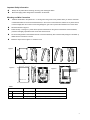
Output Type Selection Power off first and remove the face cover, you’ll see Jumper J1~J3 on the upper left of the PCB board and Jumper S1~S6 in the middle right of the PCB board. With Jumper J1, you may be able to select the starting point of the analog output. J2 & J3 are just for manufacture test, with default of disconnection. Please don’t change it! With Jumper S1~S6, you may be able to select either voltage or current output type. Please note that jumper S5 & S6 are corresponding to CO2 output, while S3 & S4 for temperature output, and S1 & S2 for humidity output. Choose the output type you want by following instructions shown in table below Jumper S5~S6 Jumper J1 Analog output for CO2 Upper two pins blocked disconnected 0~10VDC Lower two pins blocked disconnected 0~20MA Upper two pins blocked Connected 2~10VDC Lower two pins blocked Connected 4~20MA (default) 3