1
NO
EN
•
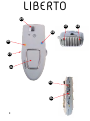
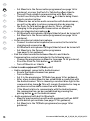
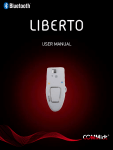
Status lamp 28 :
Shows whether Liberto communicates with Maestro.
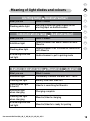
See table on page 18 for explanation of the light signals.
•
Microphone selector 29 :
Used to change between the Directional microphone and the Omni
microphone (see explanation below)
•
Battery indicator lamp 30 :
Shows the battery level on Liberto.
See table on page 18 for explanation of the light signals.
•
Directional microphone 31 :
Captures sound in a certain direction and reduces background noise.
•
Omni microphone 32 .
Captures sound in all directions (360 degrees).
•
Off/On button 33 .
Turns the unit off and on.
•
Volume button 34 :
Used to change the sensitivity/strength of the microphones.
F
D
NL
ES
SE
DK
SU
All sound from Maestro is only heard if you use the hearing aid/CI in T or
MT position and have the loop around the neck, or if earbuds/headset is
used.
CIBS Total’s functions
CIBS Total has 3 main functions:
1. Amplifier for TV/Radio, etc. (TV/RADIO):
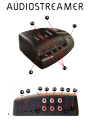
Transmits sound wirelessly from TV/Radio,etc. via the Audiostreamer
to Maestro. You can choose between 4 different audio sources on the
Audiostreamer. You can also receive an alert from your alerting system
if this has an audio output and is connected to the Audiostreamer. The
alerting signal will have the highest priority and will overrule all audio
sources and telephone calls. In order to connect audio equipment
without Bluetooth you must use COMMidt’s audio cable (accessories,
art. no. 908-001) in order to input the sound in Maestro.
NOTE!
You will not be able to receive an alerting signal on Maestro as long
as it has an active audio connection to a Liberto, Allegro or other
AD2P-bluetooth products.
9
User manual CIBS Total (NO_GB_F_DE_NL_ES_SE_DK_SU) 1i