1
M U LT E N E T
1.
2.
3.
4.
P O C K E T PA D R O U T E R
Connect the Serial, Ethernet and Power cables.
Configure the IP Address and Subnet Mask using EtherPAD Explorer.
Configure the Serial Port parameters.
Configure the PPP parameters.
1. Connect the Serial, Ethernet and Power cables.
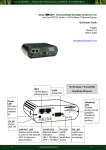
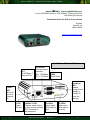
Serial Line Connection
Check the type of serial device you wish to connect to your PocketPAD.
RS232 only
For DCE devices (e.g. modems) you require
a straight serial cable, while for DTE devices
(e.g. computers) you require a crossed serial
cable. Standard off-the-shelf cables can be
used (check the user manual for detailed pin
outs).
Connect your modem to the PocketPAD’s COM 1.
Pin
1
2
3
4
5
6
7
8
9
RS232
CD
RX
TX
DTR
GND
DSR
RTS
CTS
RI
Ethernet Network Connection
Connect your Ethernet cable to the PocketPAD. The LNK LED
will light up if the connection is good. The 10/100 LED will light if
100 Base-TX is available.
If the PocketPAD is connected directly to your PC, use a crossed
Ethernet cable. If it is connected via a hub or switch, use a
straight Ethernet cable.
RJ45 Connector
Power Supply Connection
PocketPAD
A 5Vdc (2W) PSU can be connected to
the PocketPAD. A light weight Torpedo
style power supply unit is available.
If you have connected your PC COM port to the PocketPAD
COM1 port you will be able to log into the unit via a terminal
session (i.e. HyperTerminal) to configure it (check the user manual
for more details) while the TX/RX LEDs are flashing. Default
password is “user”.
2
Q U I C K S TA R T - D i a l - i n
1
TX-
2
TX+
3
RX+
4, 5
na
6
RX-
7, 8
na
Ethernet Cable
2