1
My Sage Pay User Manual
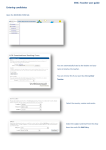
Monthly Transaction Report
You should use this option if you would like to show a list of transactions for one month. This
report show all transaction for the selected month
Select a month from the drop down list, choose the transaction states to view, choose the
transaction types to view, select the system used, and then click the
button.
Daily Summary Report
You should use this option if you would like to show a summary of transactions for one day.
This gives you a summary of one day’s worth of transactions grouped by the user who
performed them.
Select a day from the drop down list, choose the transaction states to view, choose the
transaction types to view, select the system used, and then click the
Page 28 of 32
button.