1
F. NORITAKE EMULATION MODE (Default Setting)
The default status in this mode when power on after power on sign is that a block
shaped cursor formed of 5 by 7 dots is blinking at a rate about 1 cycle per second at the
leftmost position of the 1st row on the display area. Any displayable code under the
correct protocol received will be displayed at the position of the cursor and the cursor
will be moved to the right by one position. When the cursor is already at the rightmost
position of either row, it will move to the leftmost position of the other row on
receiving a displayable code. The non-displayable codes are basically used as
commands to the display unit.
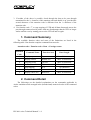
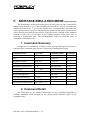
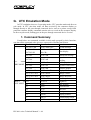
1. Command Summary
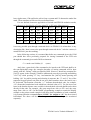
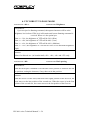
Listed below are commands available in this mode grouped by their functions,
note that all the command codes given are expressed in Hexadecimal format:
Command Name
Hex Codes
Command Name
Hex Codes
Reset
1B 49
Cursor blinking Rate 1B 54 nn
Clear
0E
Cursor on
15
Brightness control
1B 4C bb
Cursor off
16
Change font page
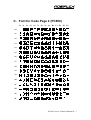
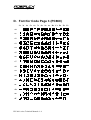
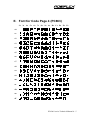
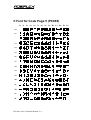
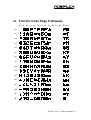
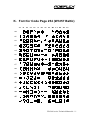
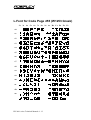
1E 0p
Back space
08
International character set
1C 0i
Horizontal tab
11 09
Moving sign
05 ·····0D
Vertical scroll up
12 09
Change leading code
06 x1 x2
Cursor up/down
11 0A
Set pass through flag
01
Line feed
12 0A
Clear pass through flag
x1 x2 02
Form feed
0C
Digit select
1B 48 pp
Carriage return
0D
User defined graphics/fonts 1B 43 ad x1 ~ x5
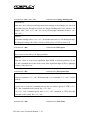
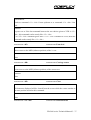
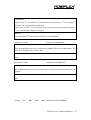
2. Command Detail
The followings are the detailed explanations on the commands applicable in
Noritake emulation mode arranged in the (hexadecimal) numerical order of the
command codes:
PD-2601 series Technical Manual 3 - 34