1
Getting to Know Your Computer
Opening the LCD Panel
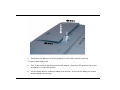
At the front of the Notebook you will find a retaining latch on the display panel that locks the
display in closed position when the Notebook is not in use.
1.
Slide the display panel latch to the right until the display panel releases, and then raise the LCD
screen.
2.
At any time you can tilt the display toward or away from you to a comfortable viewing position.
C
CA
AU
UTTIIO
ON
N::
To avoid damage to the display panel:
1. Try not to slam the display upon closing it.
2. Try not to place any object on top when it is closed or open.
3. Be sure the system is turned off or in suspend mode before you close the display
panel.
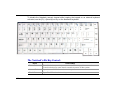
With the LCD screen open, you will see several features important for operating your Notebook
computer.
3