1
Appendix C: Introduction to Hard Drive Storage
All modern (circa 2007) personal computers make use of at least one partitioned
hard drive. Knowing at least the basics of how hard drive partitioning and file
systems work can help you understand how to work with TeraByte Unlimited
imaging products. The information about physical hard drives that follows is
intended to be a broad overview to provide you with a general understanding of the
hard drive.
The Physical Hard Drive
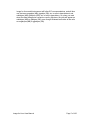
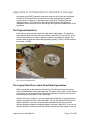
Hard drives contain several round, thin, rigid disks called platters. The rigidity of
these platters serves as the basis for the terms “hard disk” and “hard drive”. In the
center of each platter is a hole by which the platter is mounted to a spindle. The
platters rotate around this spindle at high speed (typically 5,400 to 10,000 rotations
per minute, or RPM).
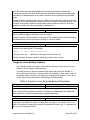
Internal view of a hard drive in operation. The arm appears blurred due to its rapid movement.
Photo courtesy of Michael Blessenohl
The Logical Hard Drive—Hard Drive Data Organization
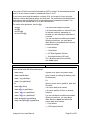
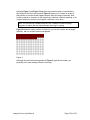
Data is organized on the platters of hard drives in the form of tracks and sectors,
which are established during manufacturing. The tracks, which exist on each side of
each platter, are concentric circles. Sectors are defined by radial lines that go from
the center point of the platter to the outer edge.
When you set up a hard drive, you can create logical partitions. A logical partition is
simply a conceptual division on the hard disk. You can use different file systems in
different partitions, and many users partition hard disks so that they can store
different operating systems or segregate data on the same hard drive. If you set up
different partitions so that you can use different operating and file systems, you can
Image for Linux User Manual
Page 127 of 150