1
Appendix D: Special Relays
1
2
3
D
5
6
7
8
9
10
11
12
13
14
A
B
C
D
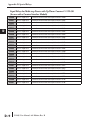
DL230 CPU Special Relays
Startup and Real-Time Relays
SP0
First scan
On for the first scan after a power cycle or program to run transition only. The relay is
reset to off on the second scan. It is useful where a function needs to be performed
only on program startup.
SP1
SP2
SP3
SP4
SP5
SP6
SP7
Always ON
Provides a contact to insure an instruction is executed every scan.
Always OFF
Provides a contact that is always off
1 minute clock
On for 30 seconds and off for 30 seconds.
1 second clock
On for 0.5 second and off for 0.5 second.
100 ms clock
On for 50 ms. and off for 50 ms.
50 ms clock
On for 25 ms. and off for 25 ms.
Alternate scan
On every other scan.
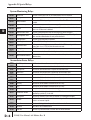
CPU Status Relays
SP12
SP16
SP20
SP22
Terminal run mode
On when the CPU is in the run mode.
Terminal program mode
On when the CPU is in the program mode.
Forced stop mode
On when the STOP instruction is executed.
Interrupt enabled
On when interrupts have been enabled using the ENI instruction.
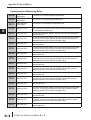
System Monitoring
SP40
SP41
SP43
SP44
Critical error
On when a critical error such as I/O communication loss has occurred.
Warning
On when a non critical error such as a low battery has occurred.
Battery low
On when the CPU battery voltage is low (only if bit 12 of V7633 is set).
Program memory error
On when a memory error such as a memory parity error has occurred.
SP45
I/O error
On when an I/O error occurs. For example, an I/O module is withdrawn from the
base, or an I/O bus error is detected.
SP47
I/O configuration error
On if an I/O configuration error has occurred. The CPU power-up I/O configuration
check must be enabled before this relay will be functional.
SP50
SP51
Fault instruction
On when a Fault Instruction is executed.
Watch Dog timeout
On if the CPU Watch Dog timer times out.
SP52
Grammatical error
On if a grammatical error has occurred, either while the CPU is running or if the
syntax check is run. V7755 will hold the exact error code.
SP53
Solve logic error
On if CPU cannot solve the logic.
D–2
DL205 User Manual, 4th Edition, Rev. B