1
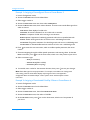
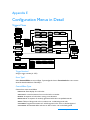
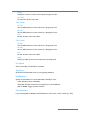
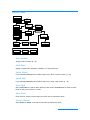
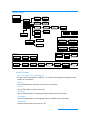
Alarms Menu
Main Menu
Triggers
Alarms
Alarm
Number?
Setup
Info
Integer 0-15
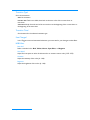
Specific
Month?
Specific Day?
Integer 1-12
Integer 1-31
Alarm Days?
Specific Date
Every Day
Weekends
Alarm Time?
Weekdays
Mondays
Time Editor
Alarm Type?
Tuesdays
Wednesdays
Time-of-day
Astronomical
Thursdays
Fridays
Show Number?
Saturdays
Integer 0-255
Sundays
Sunrise or
Sunset?
Sunrise
Sunset
Offset Hr?
Offset Min?
Save Changes?
Integer -12 to 12
Integer 0 to 59
Yes
No
Time Editor
Hour?
Minute?
Second?
Integer 00-23
Integer 00-59
Integer 00-59
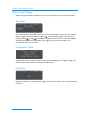
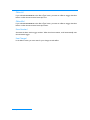
Alarm Number?
Assign an alarm number (0 - 15).
Alarm Days?
Specify a specific date, weekends, weekdays, or a day of the week.
Specific Month?
If you selected SPECIFIC DATE in the Alarm Days? menu, enter a month number (1 - 12).
Specific Day?
If you selected SPECIFIC DATE in the Alarm Days? menu, enter a day number (1 - 31).
Alarm Type?
Select TIME-OF-DAY to create an alarm based on clock time or ASTRONOMICAL to create an alarm
based on the time of sunrise or sunset.
Alarm Time?
Enter the hour, minute, and seconds as the clock time to activate the alarm.
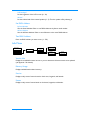
Sunrise of Sunset?
Select SUNRISE or SUNSET as the astronomical time to activate the alarm.
iPlayer 3 User Guide 42