1
iDP-3530 User’s Manual
CONTENTS
1. Introduction ............................................................................................................................................................4
1-1 Features ............................................................................................................................................................4
1-2 Accessories.......................................................................................................................................................4
2. Basic Specifications................................................................................................................................................5
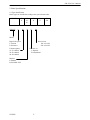
2-1 Type classifications ..........................................................................................................................................5
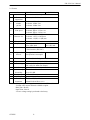
2-2 Features ............................................................................................................................................................6
3. External Appearance and Parts Descriptions..........................................................................................................7
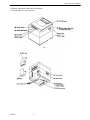
3-1 External appearance and parts names...............................................................................................................7
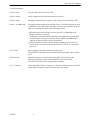
3-2 Parts Descriptions.............................................................................................................................................8
4. Preparation............................................................................................................................................................10
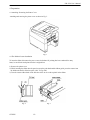
4-1 Setting / Removing the Printer Cover ............................................................................................................10
4-2 The Ribbon Cassette Installation....................................................................................................................10
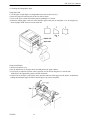
4-3 Loading and Changing the Paper ...................................................................................................................11
4-4 Attaching / Removing the Paper Cover and Stacker ......................................................................................12
4-5 Self Test Printing............................................................................................................................................12
4-6 Alarm and Paper Near-End Detection............................................................................................................13
4-7 General Cautions ............................................................................................................................................13
5. Serial Interface......................................................................................................................................................14
5-1 Specifications .................................................................................................................................................14
5-2 Connector Pin Assignment.............................................................................................................................14
5-3 Input / output Signals .....................................................................................................................................15
5-4 Data Composition...........................................................................................................................................16
5-5 Error Detection...............................................................................................................................................16
6. Parallel Interface...................................................................................................................................................17
6-1 Specifications .................................................................................................................................................17
6-2 Connector Pin Assignment.............................................................................................................................17
6-3 Description of Input / Output Signals.............................................................................................................18
6-4 Electrical Characteristics................................................................................................................................19
6-5 Timing Chart ..................................................................................................................................................20
7. Function Selection by Dip Switch ........................................................................................................................21
7-1 Dip-Switch (DS-1) Setting .............................................................................................................................21
7-2 Dip-Switch (DS-2) Setting .............................................................................................................................21
7-3 Dip-Switch Location ......................................................................................................................................22
8. Print Control Functions ........................................................................................................................................23
8-1 SI & SO Code.................................................................................................................................................23
8-2 Function Code ................................................................................................................................................23
8-3 Input Data Formats.........................................................................................................................................24
9. Initial Setting ........................................................................................................................................................26
10. Maintenance .......................................................................................................................................................26
11. Character Code Tables ........................................................................................................................................27
11-1 International Character Codes ......................................................................................................................27
11-2 Individual Country Character Codes ............................................................................................................28
CITIZEN
3