1
Frequently Asked Questions
How do I log into the EPAF system?
Are there any special settings I need to set before working in the EPAF system?
How do I originate an EPAF?
How do I approve an EPAF in my queue?
How do I know what position number/suffix to use for the EPAF I am originating?
Is the contract for the EPAF I am originating a primary or a secondary contract?
What about EPAFs for Restricted and Research Funded Positions?
Why do I have to enter two EPAFs for students who have federal work study?
What is the purpose of the Comments field in the EPAF system?
What is a Proxy?
Logging into the EPAF (Electronic Personnel Action Form) system
To access the EPAF system, log onto the Banner Web for Employees using the username and password you use to log
into your computer.
https://banner-as1.admin.wpi.edu/pls/prod/twbkwbis.P_WWWLogin
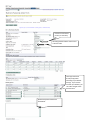
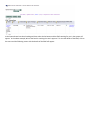
Once you are logged in, click on the Employee Tab, and enter the EPAF system by clicking on the EPAF Administrator
menu item toward the bottom of the list and depending on your security access, a menu similar to the one below will
appear:
Return to Top