1
Product descHption
Features
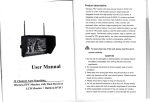
11Front view:
●H∶ gh brightness,contrast,high res° Iution With sun
shade,visibIe under the sunshine
・BuiⅡ ”
in VIDE0/AUDIo/HDMIinputs,enabIe for aˇ
ar∶
ous of
signal
・EXterna1remote control,to controIthe functions ofthe mon
itor:n distance
●0p刂 onalfor externaI ba廿 ery pIate and various ba仗 eries for
outdoor usage
●4F Buttons can be seIfˉ deⅠ ned for di矸erent function,
●Picture zoom can be operated fuⅡ ˉ
screen,up`doWn,
IefVJght
●Camera mode,screen marker,centre marker,picture
freeze,mirror piCture,check feId,p∶ cture to piCture,
peaking focus
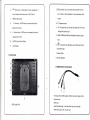
PoWerIndicator Ⅱ
ght∶ when power on/standby,it turns red;
When signalin,Ⅱ turns green!
d9∶ P。 wer。 n/ofl
F4∶
CON丁 ENTs
1 Product descr∶
pt∶
ˉ¨
ˉ……ˉ……………3
onˉ ¨ˉ
g
¨¨…………ˉ
ˉ
2,operat∶ on instructionˉ ¨¨¨¨ˉ
custom button,enter secondary menu item
F(se|「
F3∶
custom bu廿 on same as F4operation
3.TechnicaI parameters-¨ ¨¨…ˉ…ˉ………ˉ
15
ˉ……¨¨ˉ
16
4Troubte shootingˉ ˉ¨¨¨¨¨~¨ …ˇ
de1ned button),then self-deⅡ ne the function that
user need
^`F2∶
MuRibutton ln OSD Menu forup odjustment Ⅱcan
be custom bu廿 on VVhen notin OsD see F4