1
34
4.4. Deleting a Detector
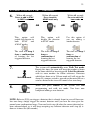
TO DELETE A DETECTOR
1.
Safety Lock must be
off
Ensure Safety Lock has been turned off within the last 5
minutes. See Section 4.2.
Enter Programming mode by pressing buttons 1 & 2
together for 3 seconds. The siren will beep 3 times to
confirm you have entered programming mode.
2.
Press both buttons
for 3 seconds
Within 3 seconds, press Button 1 to select detector
programming. You will hear 1 beep as confirmation.
3.
Press 1 time
Within 30 seconds, press Button 2 to DELETE a
detector. You will hear 2 beeps as confirmation.
4.
Press 1 time
5.
Within 5 seconds, press Button 1. The first beep you
hear indicates zone 1. Each additional press of Button 1
will increment the zone you wish to delete and you will
Press the number of hear 1 beep each time. For example, if you push Button
times of the zone you 1, five times then this would select zone 5 to be deleted.
want to delete
6.
Press to delete &
exit
Within 5 seconds press Button 2. The selected zone will
be deleted. The system will beep the number of times of
the zone that has been deleted (if you hear 3 low tone
beeps, you have passed zone 8, or no valid zone was
selected). You have now completed deleting a detector.
The system will exit programming mode.