1
Voltage balancing and monito ring in the dis charge process
Voltage balancing and monito ring in the dis charge process
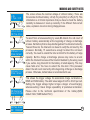
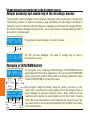
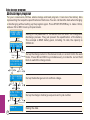
The processor monitors voltage of each cell when the battery packs are during its “storage” and
“discharging” process. To achieve this feature, plug each battery to the charger individually. If
voltage of any cell is abnormal, B6 will show error message and terminate the program forcibly.
So if there is battery damage or disconnection, you can see the error message and press INC to
know which cell is damaged.
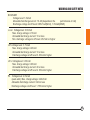
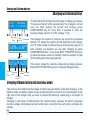
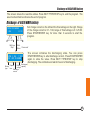
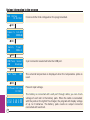
BATTERY VOL ERR
CELL
LOW VOL
The processor detects voltage of one cell is too low.
INC
4.14
2.18
4.16
0.00
4.09
0.00
The 4th cell was damaged. The value of voltage may be zero if
disconnection occurs.
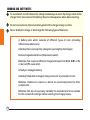
Charging of NiCd/NiMH battery
NiCd
N
I M H Sensitivity
C H AR G E Au t
C
U R L I M IDefault
T 5. 0 A
D.Peak
- +
DEC
INC
Batt type
Stop
- +
DEC INC
Start
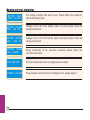
Enter ‘>3 seconds’This
N I M H 2 .0 A 7 . 42 V
C H G 0 2 2: 4 5 0 0 89 0
Battery
Elapsed
Battery time Chargevoltage
type
Charged
current
capacity
21
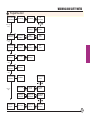
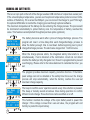
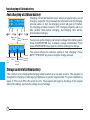
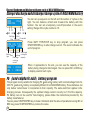
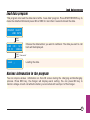
This program is for charging and discharging of NiCd/NiMH batteries
associated with R/C models applications. You can press START/ENTER
key to make it blink and then INC or DEC to change the parameter value.
Press START/ENTER key to store the value.
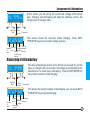
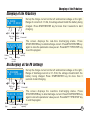
program charge the battery using the current you set up. In the
“auto” state, you should set up the upper limit of the charge current to
avoid damage by excessive feeding current. Some batteries of low
resistance and capacity can lead to higher current in the “auto” charging
mode. But in the manual mode, it will charge with the current you set. You
can make it blink in the current field and press INC and DEC at the same
time to switch mode.