1
OmniClient –User’s Guide (V1.02)
1. Table of Contents
Contents
1. Table of Contents ...........................................................1
1.1. Table of Figures ..........................................................2
2. Introduction ................................................................3
2.1. Symbols used in this Guide ................................................4
3. Important Instructions ......................................................5
3.1. Note on the Warranty ......................................................5
3.2. Exclusion of Accident Liability Obligation ................................5
3.3. Liability Limitation / Exemption from the Warranty Obligation .............5
4. General Safety Instructions for IT Equipment ................................6
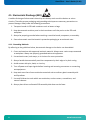
4.1. Electrostatic Discharge (ESD) .............................................8
4.1.1. Grounding Methods .....................................................8
4.2. Instructions for the Lithium Battery ......................................9
5. Electromagnetic Compatibility (Class A Device) .............................10
5.1. Electromagnetic Compatibility (EU) .......................................10
5.2. FCC Statement (USA) ......................................................10
5.3. EMC Compliance (Canada) ..................................................10
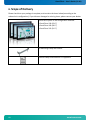
6. Scope of Delivery ..........................................................11
6.1. Optional Parts ...........................................................12
6.2. Type Label and Product Identification ....................................13
7. Product Description ........................................................14
7.1. OmniClient Touch Monitor Base ............................................15
7.2. OmniClient Compter Base ..................................................17
7.3. Product Images OmniClient 21.5” AC PSU (other units similar) .............18
7.4. Front View ...............................................................19
7.4.1. Display with Touch Screen ............................................20
7.4.2. Front Plate ..........................................................20
7.4.3. Calibrating the Touch Screen .........................................20
7.5. Bottom Side (with Interfaces) ............................................21
7.5.1. Power and Grounding ..................................................22
7.5.2. Interfaces ...........................................................24
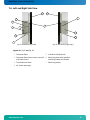
7.6. Left and Right Side View .................................................25
7.7. Top Side .................................................................26
7.8. Rear Side ................................................................27
7.9. PCIe Riser Card ..........................................................27
8. Accessing Internal Components ..............................................28
8.1. Installing/Removing the Expansion Cards ..................................29
8.2. Replacing the Removable HDD Tray .........................................30
8.3. Replacing the Lithium Battery ............................................31
9. Installation Instructions ..................................................32
9.1. Operating System and Hardware Component Drivers ..........................35
10. Maintenance and Prevention.................................................36
10.1. Touch Screen Care and Cleaning ..........................................36
www.kontron.com
1