1
RNetCall
SINGLE APP FOR ALL YOUR CALLING NEEDS & MORE
Installing RNetCall App
on your iPhone
(iOS Version 6.0 & above)
through App Store
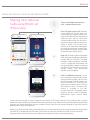
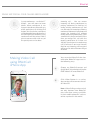
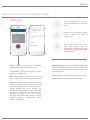
Welcome to RNetCall, one of the largest
international VoIP calling services. It helps you call,
conference and connect with your social circles
effortlessly and instantly across 200 countries.
RNetCall is an intelligent bundled service, offering
affordable International Long Distance calling, Free
Video calls, audio conferencing and Instant
Messaging for smartphones, Tablets and PCs.
With Switch Call feature on Phone and Tablet app,
RNetCall helps you stay connected even if your
internet connectivity (3G/4G or Wi-Fi) is disabled or
inaccessible. Simply switch from VoIP calling to
mobile calling with just a tap.
Let these and several other features make your
experience with RNetCall a happy one.
Live. Share. Connect.
RNetCall App - Version 2.0.5
Do not show this message again
CONTINUE
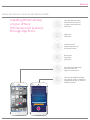
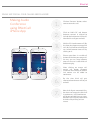
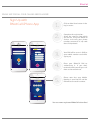
1.
Visit App Store on your
iPhone (iOS Version 6.0
& above) and search for
‘RNetCall’
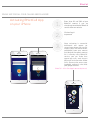
2.
Select the
‘RNetCall’
3.
Click on 'Install'
button appearing on
the phone screen.
4.
Enter your
App Store
password.
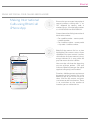
5.
On successful download
RNetCall icon will
appear on the screen.
6.
Description of RNetCall App
will appear, Click on ‘Continue’
to proceed further as shown in
following screen.