1
Fluxus Manual [version 0.16] : This work is licensed under Creative Commons Attribution-Share Alike 2.5 Generic
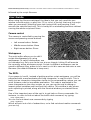
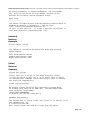
Will draw a green, then a red cube. The (with-state) isolates a state and gives it
a lifetime, indicated by the brackets (so changes to the state inside are applied
to the build-cube inside, but do not affect the build-cube afterwards). Its useful
to use the indentation to help you see what is happening.
The Scene graph
Both examples so far have used what is known as immediate mode, you have
one state stack, the top of which is the current context, and everything is
drawn once per frame. Fluxus contains a structure known as a scene graph for
storing objects and their render states.
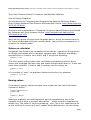
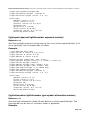
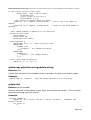
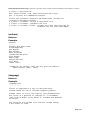
Time for another example:
(clear) ; clear the scenegraph
(colour (vector 1 0 0))
(build-cube) ; add a red cube to the scenegraph
(translate (vector 2 0 0))
(colour (vector 0 1 0))
(build-cube) ; add a green cube to the scenegraph
This code does not have to be called by (every-frame), and we use (build-cube)
instead of (draw-cube). The build functions create a primitive object, copy the
current render state and add the information into the scene graph in a
container called a scene node.
The (build-*) functions (there are a lot of them) return object id's, which are just
numbers, which enable you to reference the scene node after it’s been created.
You can now specify objects like this:
(define myob (build-cube))
The cube will now be persistent in the scene until destroyed with
(destroy myob)
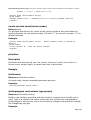
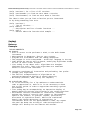
with-state returns the result of it’s last expression, so to make new primitives
with state you set up, you can do this:
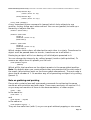
(define my-object (with-state
(colour (vector 1 0 0))
(scale (vector 0.5 0.5 0.5))
(build-cube)))
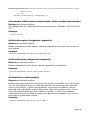
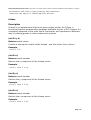
If you want to modify a object's render state after it’s been loaded into the
scene graph, you can use with-primitive to set the current context to that of
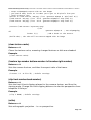
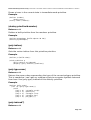
the object. This allows you to animate objects you have built, for instance:
; build some cubes
(colour (vector 1 1 1))
(define obj1 (build-cube))
(define obj2 (with-state
(translate (vector 2 0 0))
(build-cube))
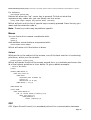
(define (animate)
Page 14