1
Connecting a smartphone
PowerWatcher works as “USB Device”, hence smartphone must be able to support OTG. The
simplest test to check this ability is connecting USB-flash memory stick to a smartphone and
making sure that it works.
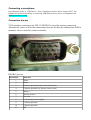
Connectors pin-out
VGA interface connector a.k.a. DE-15/ DSUB15 is used for sensors connection.
Alternatively some or all of the connecting wires can be directly soldered into PCB to
minimize errors caused by contact resistance.
DSUB15 pin-out.
Pin number
Function
1
Shunt -
2
Shunt +
3
Common potential (minus of traction battery)
4
Common potential (for thermo sensor return)
5
Battery +
6
Thermo sensor +
7
Not used
8
+5V (sensors power supply)
9
Common potential
10
Common potential
11
RX