1
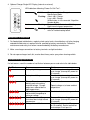
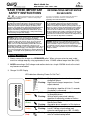
4. Optional Charger Single-LED Display (internal or external)
LED indications following “Power-On Self Test”:
Green
Solid:
Flashing:
Amber
Flashing:
Red
Flashing:
Charging complete. Charger in
Maintenance Mode.
Short: <80% Charge.
Long: >80% Charge.
When battery is not connected: Algorithm
Number display.
Reduced Power Mode: Low AC Voltage or
High internal charger temperature.
Charger error. Reset charger power and
refer to Troubleshooting below.
Maintenance Instructions
1. For flooded lead-acid batteries, regularly check water levels of each battery cell after charging
and add distilled water as required to level specified by battery manufacturer. Follow the
maintenance and safety instructions recommended by the battery manufacturer.
2. Make sure charger connections to battery terminals are tight and clean.
3. Do not expose charger to oil, dirt, mud or direct heavy water spray when cleaning vehicle.
Troubleshooting Instructions
If a fault occurs, count the number of red flashes between pauses and refer to the table below:
Red Flashes
Cause
Battery High Voltage
Battery Low Voltage
Charge Timeout caused by
battery pack not reaching
required voltage. Charger
output was reduced due to
high temperatures
Check Battery: battery could
not be trickle charged up to
minimum voltage
Over-Temperature: Charger
shut down due to high internal
temperature.
Charger Internal Fault
Solution
Check battery size and condition and
reset charger (interrupt AC power for
15 seconds).
Check battery size and condition and
reset charger (interrupt AC power for
15 seconds).
Check connections.
Operate charger at a lower ambient
temperature.
Check for shorted or damaged cells.
Ensure sufficient cooling air flow and
reset charger (interrupt AC power for
15 seconds).
Reset charger (interrupt AC power
for 15 seconds). Return to qualified
service depot if fault persists.